Payments · WeChat Pay · Setup walkthrough
How to Set Up WeChat Pay as a Foreigner (2026)
Enable the wallet, pass passport real-name check, bind an international Visa/Mastercard, then scan to pay—no Chinese bank account required. Screenshot walkthrough for travelers who already have (or just created) a WeChat account.
How to set up WeChat Pay as a foreigner in 2026 is a wallet + card procedure inside WeChat—not a separate tourist app. Cash still works at some stalls, but many shops point at a QR code first.
Do this at home: latest WeChat → enable Weixin Pay if Services/Wallet is missing → passport real-name → bind Visa/Mastercard → test a small scan. Broader registration / friend-verify context: WeChat Pay for foreigners registration guide. Full stack: China payment guide.
This guide walks through binding an international card and clearing identity checks so you are not stuck at the first QR counter. Planning a wider trip? See How to prepare for China in 2026.
I. Preparation: What You Need
Set this up at least a few days before your flight when you still have stable home Wi-Fi and SMS. Airport Wi-Fi is a poor place to finish 3D Secure.
Your setup checklist:
- The app: Latest version of WeChat from the App Store / Google Play in your home region.
- Identity document: A valid passport is the usual path for tourists. Visa-free / transit travelers: confirm passport validity under the China 240-hour visa-free transit rules that apply to you.
- International bank card: Visa, Mastercard, JCB, Discover, Diners Club (and other brands listed in-app). Confirm with your issuer that China / cross-border digital wallet charges are allowed.
- Phone number: An overseas mobile number works if it can receive international SMS. A Chinese mainland number is not required for international-card Weixin Pay setup (per WeChat Help).
- Power: Keep the phone charged—see our China packing list 2026 for cables and a power bank.
Connectivity: You generally need data to generate a payment QR code. Public Wi-Fi is unreliable for OTP and wallet screens. Many travelers land with a China eSIM already installed; for bank / email OTPs that need Western apps, pair data with a VPN you already tested at home. Compare options in our VPN vs eSIM guide and iPhone eSIM activation guide.
Notes for US travelers
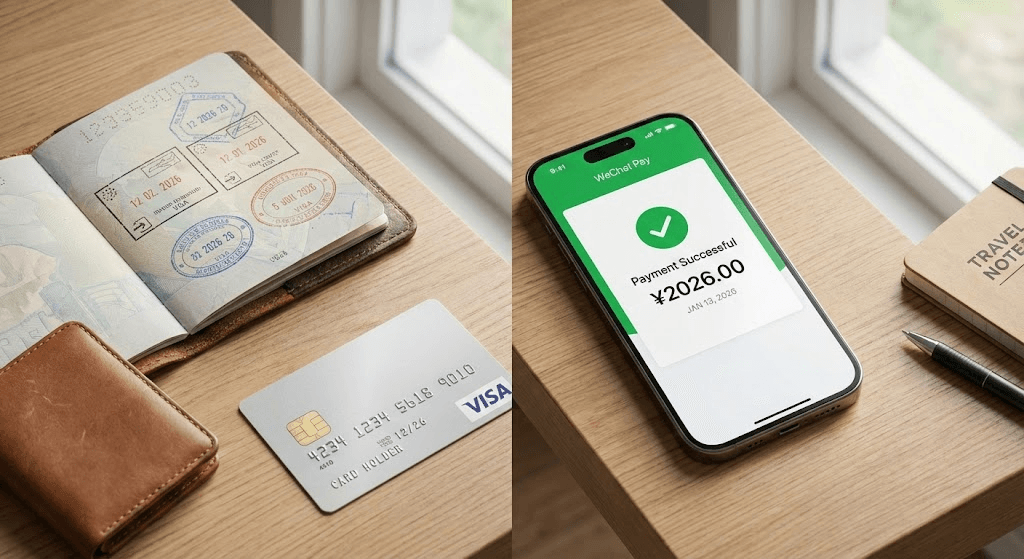
- Install on US Wi-Fi. Download WeChat (and your bank app) before you leave; store region quirks are easier to fix at home.
- Tell your bank. US issuers often flag Hangzhou / Tencent / WeChat Pay as fraud. Open a travel notice for mainland China.
- Card stack. Prefer a no-foreign-transaction-fee Visa or Mastercard. Keep a second Visa if Amex is your daily card.
- +1 SMS / push. Binding and 3D Secure still need codes on your US number—roaming, Wi-Fi calling, or the bank app must work when you approve the card.
- Prepay big tickets in USD. Hotels, trains, and attractions on Trip.com can charge your US card at home and skip large in-China QR fees.
II. Setting Up WeChat Pay for Foreigners: 3 Steps
Treat this as a financial verification flow, not a casual app install. Accepted ID types commonly include passport (biographical page; entry-stamp page if the app asks), and other Greater China travel permits for eligible residents. Bank cards from mainstream international networks (Visa, Mastercard, JCB, Discover, Diners Club, and others shown in-app) are supported for everyday merchant pay.
1. Activating the Wallet Interface
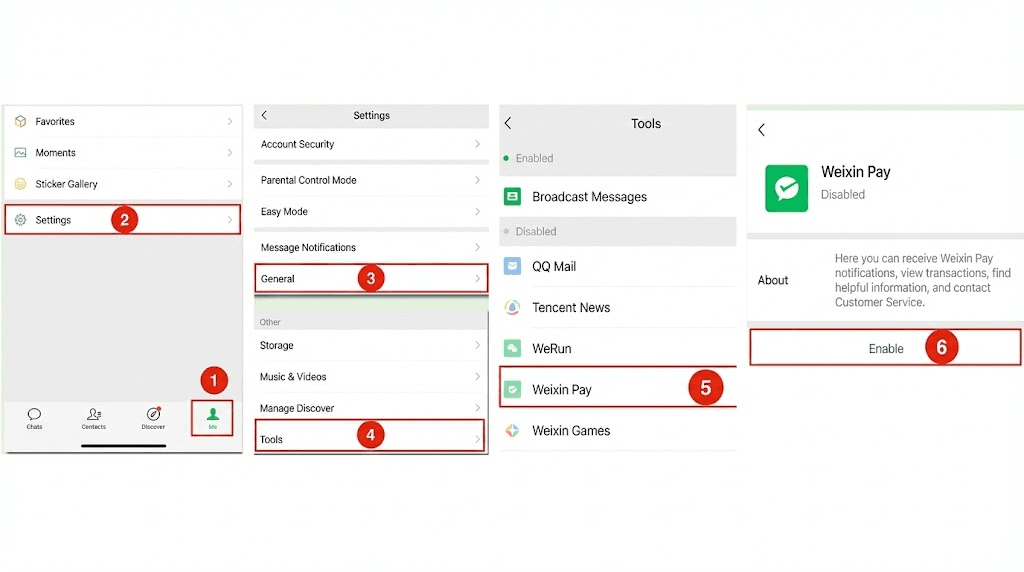
On some international WeChat builds, Services / Wallet / Weixin Pay may be hidden until you enable it.
- Go to Me → Settings → General.
- Tap Tools (sometimes labeled Auxiliary Functions).
- Select Weixin Pay and tap Enable (wording may vary by version).
2. Passing the Real-Name Identity Check
This is where many foreign setups stall.
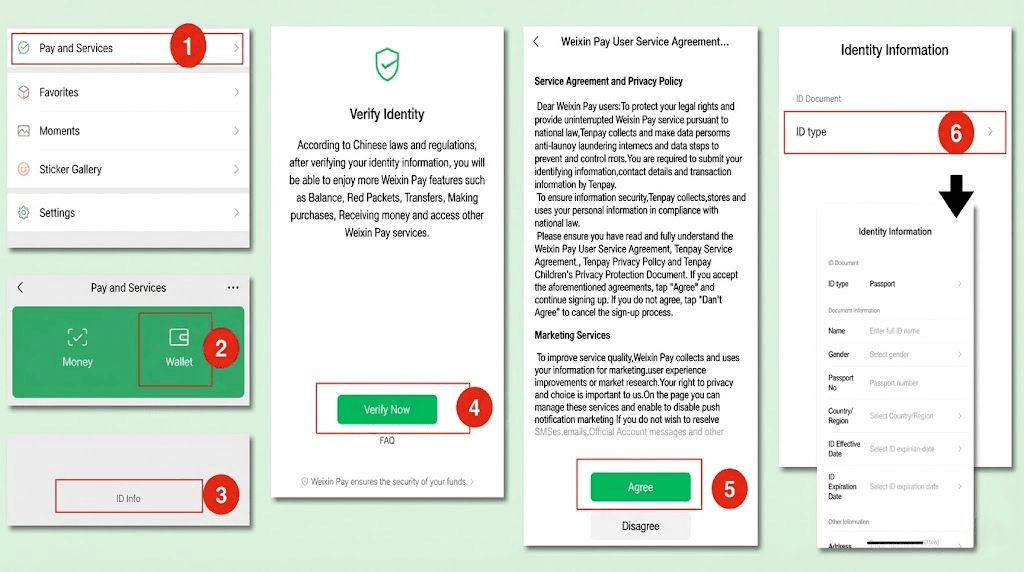
- Open real-name authentication. If your app shows it: Me → Services (or Wallet) → Wallet → ID Info → Verify Now → read the agreement → continue. Labels vary; follow the in-app path you see.
- Fill personal information. Name, gender, document type/number, expiry, occupation, and address as prompted.
- Upload documents if asked. Passport biographical page; entry-stamp page if the flow requests it.
- Bank card as helper (optional but common). Some flows ask you to add a card during ID verification: number, expiry, CVV, billing address.
Name format tip (traveler-reported)
Many travelers report failures when the name does not match the passport MRZ (often ALL CAPS, surname then given names). Match the machine-readable zone exactly, including order and spacing.
3. Binding Your International Card
Once identity clears, connect the funding source.
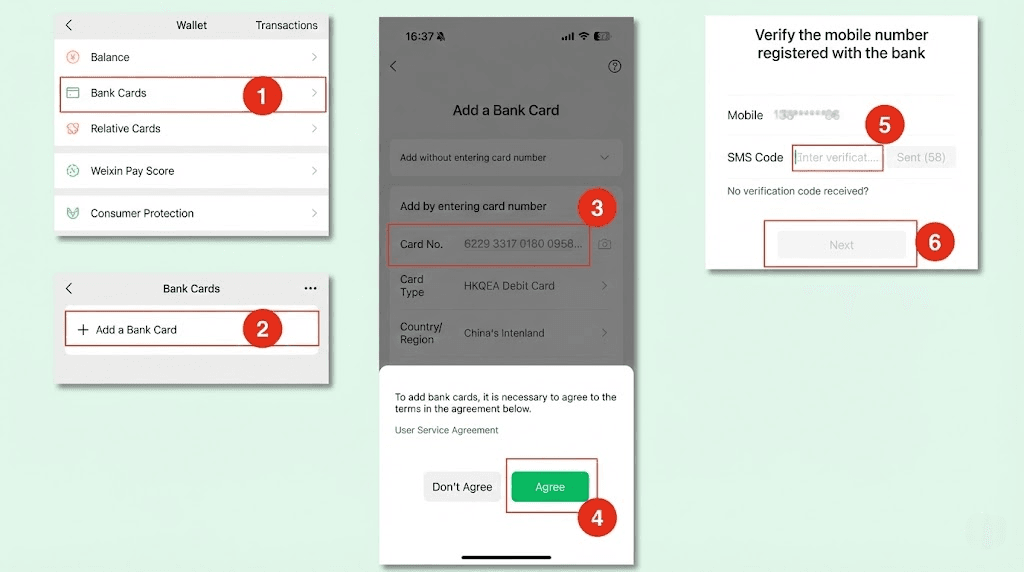
- In Wallet, open Bank Cards → Add Bank Card (wording may vary).
- Enter card details and the SMS / app code from your issuer.
- Expect 3D Secure (“Verified by Visa” / Mastercard OTP / bank push).
- Set a 6-digit payment PIN when prompted—you will use it for many active scans.
Per WeChat Help: international cards are for everyday purchases in the Chinese mainland; they do not support features like red packets and money transfers the way a local wallet does. Confirm the payment page for what your card can do.
III. Active vs. Passive Scanning
Once the wallet is live, use the right scan mode for the counter in front of you.
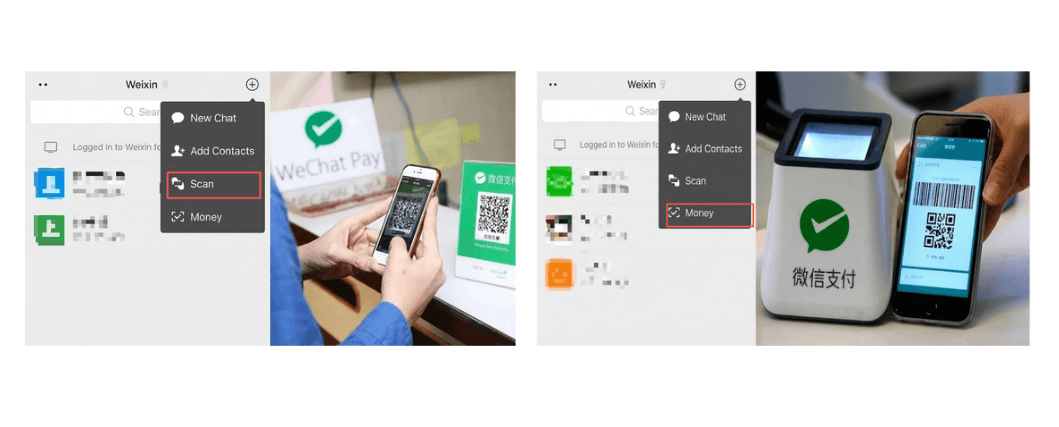
Active scan (you scan them)
- Where: Street food, small cafes, many taxi / ride drivers.
- How: Tap + (top right) → Scan. Point at their printed QR. Enter the RMB amount if asked, then your PIN.
Passive scan (they scan you)
- Where: Larger supermarkets, many convenience stores, some subway gates.
- How: Me → Services → Money (or equivalent) and show the barcode / QR. Some cities also use a Transport Code mini program—search the local metro name inside WeChat if the gate requires it.
IV. WeChat Pay for Foreigners: Limits & Fees (2026)
Foreign-card Weixin Pay has published caps and a platform fee line separate from your bank’s FX / foreign-transaction fees.
Transaction limits
WeChat Help currently lists these cumulative limits for international cards (confirm in-app; figures can be updated):
| Limit type | WeChat Help figure |
|---|---|
| Single transaction | 6,500 RMB |
| Monthly cumulative | 50,000 RMB |
| Yearly cumulative | 65,000 RMB |
Source: WeChat Help — international cards FAQ (limits & fees Q&A). Exchange rate follows the card network and your issuing bank.
Fee structure
| Single transaction | Platform fee (WeChat Help) |
|---|---|
| Under 200 RMB | Transaction fee waived |
| Above 200 RMB | 3% transaction fee (see payment page for your charge) |
Beijing municipal travel guidance (26 Mar 2026) also describes a first-time international-card promo: fee waiver on daily spend under 1,000 RMB for a limited consecutive-day window after first use, with a per-transaction savings cap—promos change; read the in-app notice. Source: english.beijing.gov.cn.
Large bills (traveler tip, not a rule)
Some travelers ask hotels or merchants to split a bill into payments under 200 RMB so each charge sits under the waiver line. Staff may refuse. Check the fee line before confirming. For hotels, booking on Trip.com Hotels with a foreign card often avoids a large QR surcharge—see foreigner-friendly hotels.
V. Troubleshooting: Why Your Payment Might Fail
First payments can fail even after a green ID check. Common traveler-reported patterns:
1. Sudden security prompts / locks
Rapid new-country spending sometimes triggers extra verification (upload card / passport). Follow the in-app prompt; unlock timing varies—do not invent a fixed wait. If the order status is unclear after a failed pay, confirm with the merchant before tapping pay again.
2. VPN / IP mismatch
Some travelers report blocks when GPS and VPN exit countries disagree. Try briefly turning the VPN off for the payment, then back on. Context: Great Firewall / VPN vs eSIM.
3. No data
You generally cannot generate a fresh payment code offline. Fix: working cellular data or a known-good hotspot. Setup: Activate eSIM for China on iPhone.
Broader fail patterns (both wallets): Alipay / WeChat Pay not working.
Conclusion
Your action plan
- Finish WeChat Pay setup a few days before travel (wallet + ID + card).
- Book intercity travel: How to book China trains on Trip.com.
- Keep Alipay as a second wallet: How to use Alipay in China (2026) and/or Alipay without a Chinese bank.
- Carry a small amount of RMB cash as backup.
FAQ
How do I set up WeChat Pay as a foreigner?
Install WeChat, enable Weixin Pay if Wallet is hidden, complete passport real-name verification, bind an international card, then pay by active or passive scan. No Chinese bank account is required for typical tourist merchant pay.
Can I withdraw cash from WeChat Pay with a foreign card?
No for the usual international-card tourist path. WeChat Help states international cards support everyday purchases in mainland China, not red packets / transfers (and not ATM cash-out the way a local balance might).
Can I top up WeChat Balance with an international card?
Typically no for foreign cards—the wallet charges your linked card per merchant payment rather than letting you preload a tourist balance. Confirm what your Wallet screen offers.
Do all merchants accept international cards via WeChat?
Most merchant QR flows work, but some personal / peer codes fail for foreign BINs. Ask before paying, and keep Alipay + cash as backup.
Does WeChat Pay work for the subway?
Often yes via passive scan at the gate or a city Transport Code mini program (search e.g. Shanghai Metro inside WeChat). Exact flow depends on the city.
Why does Real-Name Authentication fail?
Traveler reports commonly point to name formatting (MRZ mismatch), blurry passport photos, or incomplete expiry / address fields—not an official failure-rate table. Retry with MRZ-exact spelling; if the app asks for an entry stamp, upload a clear photo.
Is this the same as the WeChat Pay registration guide?
No. That page covers broader registration / eligibility. This page is the screenshot how-to: enable wallet, ID, bind card, scan modes, fees.