
China trains · Trip.com · 2026
How to Book China Train Tickets on Trip.com (2026)
Passport checkout, English search, and e-ticket gates—plus when 12306 is still worth the hassle, which seat to pick, and what China Railway charges if you cancel.
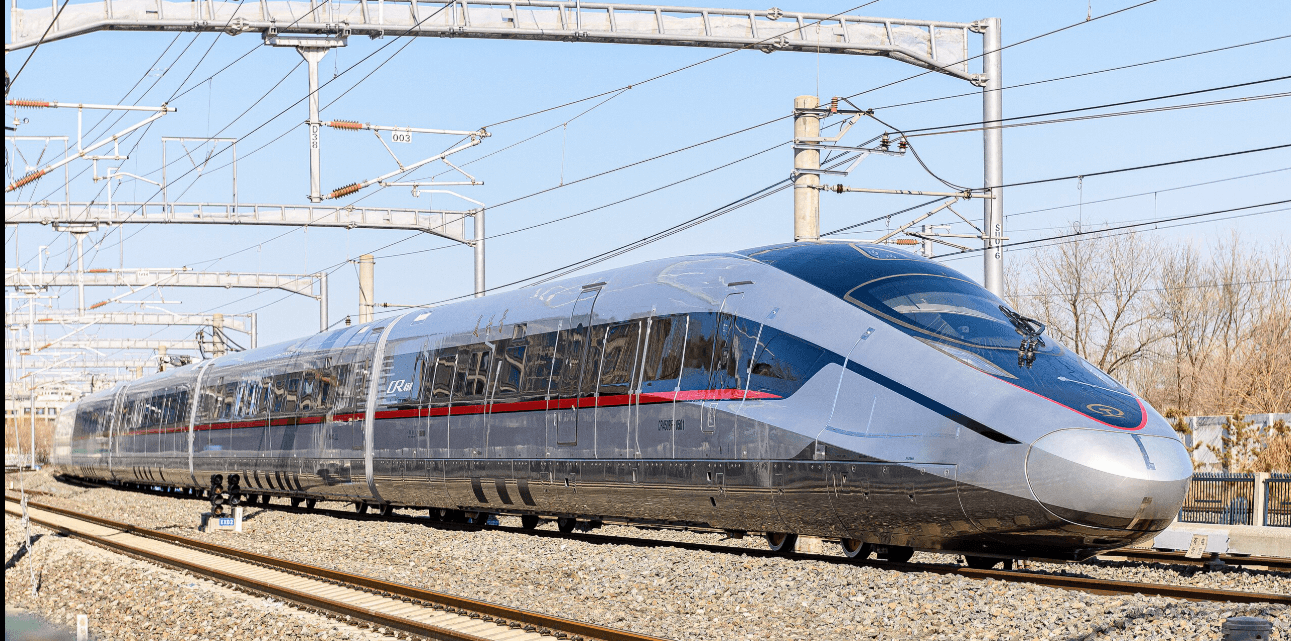
China train tickets on Trip.com are the same China Railway seats you would get on 12306—you are not buying a different train. What you pay for is English checkout, foreign cards, and passport booking from abroad. For most first-time visitors, that trade-off is worth the service fee.
Book on Trip.com if you are outside China, pay with a foreign card, or do not want to fight 12306 passport review. Try 12306 if you already read Chinese, have a working China payment method, and want to skip the OTA fee. Related: Trip.com train booking review · 12306 vs Trip.com apps.
Paper tickets are mostly gone on high-speed routes. You still need the right ID on the booking and a passport that scans at the gate. Mess up the name spelling once and the e-ticket will not open the barrier.
1. Trip.com vs 12306 for China train tickets
12306 is the official China Railway channel. Trip.com sits on top of that inventory and adds English UI, international cards, and customer chat. You pay a service fee; you do not get a “better” seat than someone who booked the same train on 12306.
Why we still point most readers to Trip.com:
- Passport booking from abroad — fewer travelers get stuck in long foreign-passport review on 12306 (still something many people hit; it is not universal).
- Cards that work outside China — Visa/Mastercard and common wallets show up at checkout more often than on the official app.
- English change/cancel help — useful when weather or a schedule change forces a rebook. Trip.com still has online change windows; see their change & cancellation policy.
- Reservation / waitlist tools — handy on peak routes. Stock still comes from China Railway, so holidays sell out on every channel. More on grab odds: estimated chance of securing tickets.
Skip the fee only if you are comfortable with Chinese UI and already have a payment method 12306 accepts. App setup notes: China train apps for foreigners.
2. How to book China train tickets on Trip.com (5 steps)
This is the usual path for a Beijing–Shanghai or Shanghai–Hangzhou G-train. Button labels in your app may differ slightly; follow what you see on screen.
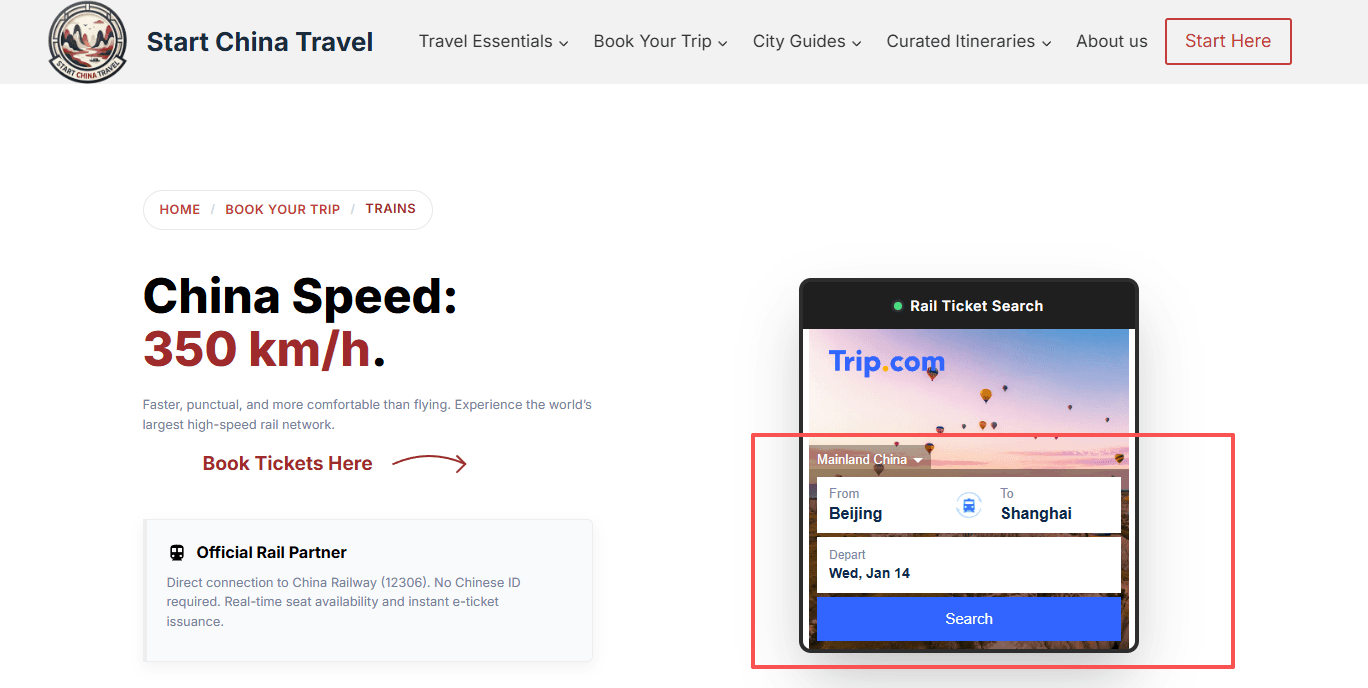
Step 1: Search stations and date
Open the Trip.com China trains page. Type English city or station names (Beijing, Shanghai Hongqiao, Hangzhou East).
- Release window: most tickets go on sale 15 days ahead (China time). For Chunyun / Golden Week, book as soon as the window opens, or use Trip.com reservation/waitlist if the train is already greyed out.
- Match the station to your hotel district—Shanghai alone has Hongqiao, Shanghai Station, and Shanghai South.
Step 2: Pick the train letter (G / D / Z / T / K)
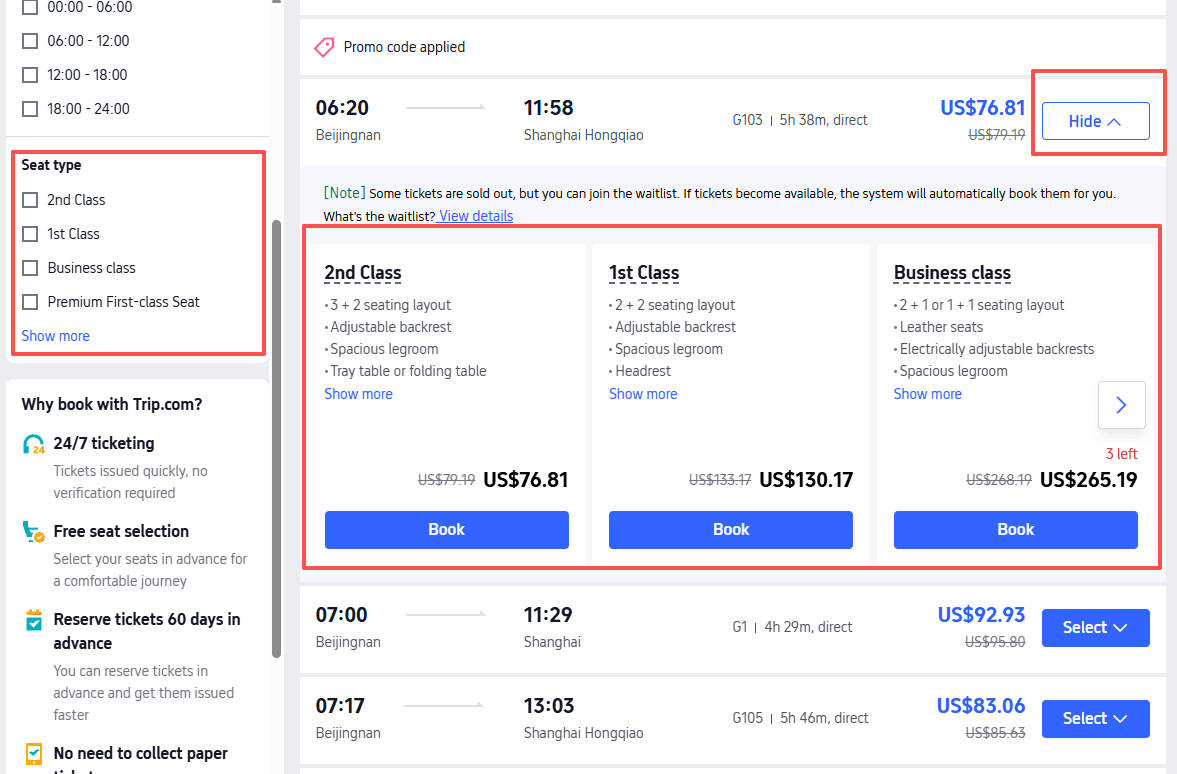
The letter on the train number matters more than the marketing name:
- G (Gaotie): fastest EMUs, usually 300+ km/h on dedicated lines—default for tourist city pairs.
- D (Dongche): still high-speed, often a bit slower or cheaper than G on the same corridor.
- Z / T / K: conventional overnight or slower day trains. Fine for hard/soft sleeper trips; not the same product as HSR.
Route context: China high-speed rail for foreigners.
Step 3: Enter passport details exactly
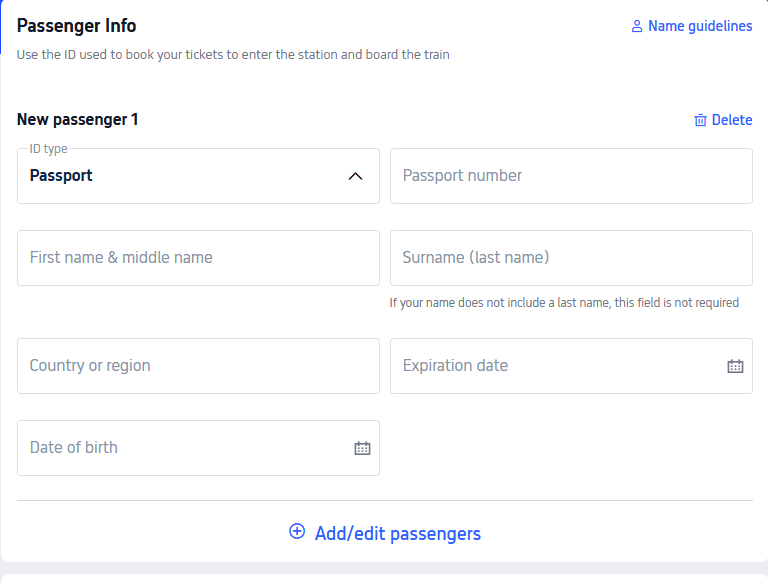
- Full name: as printed in the passport machine-readable zone / biodata page—no nicknames.
- Passport number: one wrong digit and the gate will reject you.
- Email: use an inbox you can open in China (or download the confirmation PDF/QR before you lose Wi-Fi).
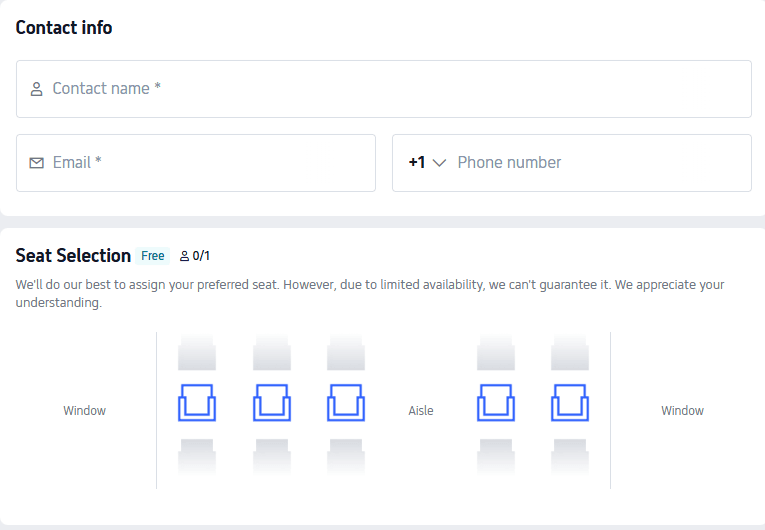
Step 4: Choose window / aisle (or sleeper bunk)
On many G/D trains you can request a preference:
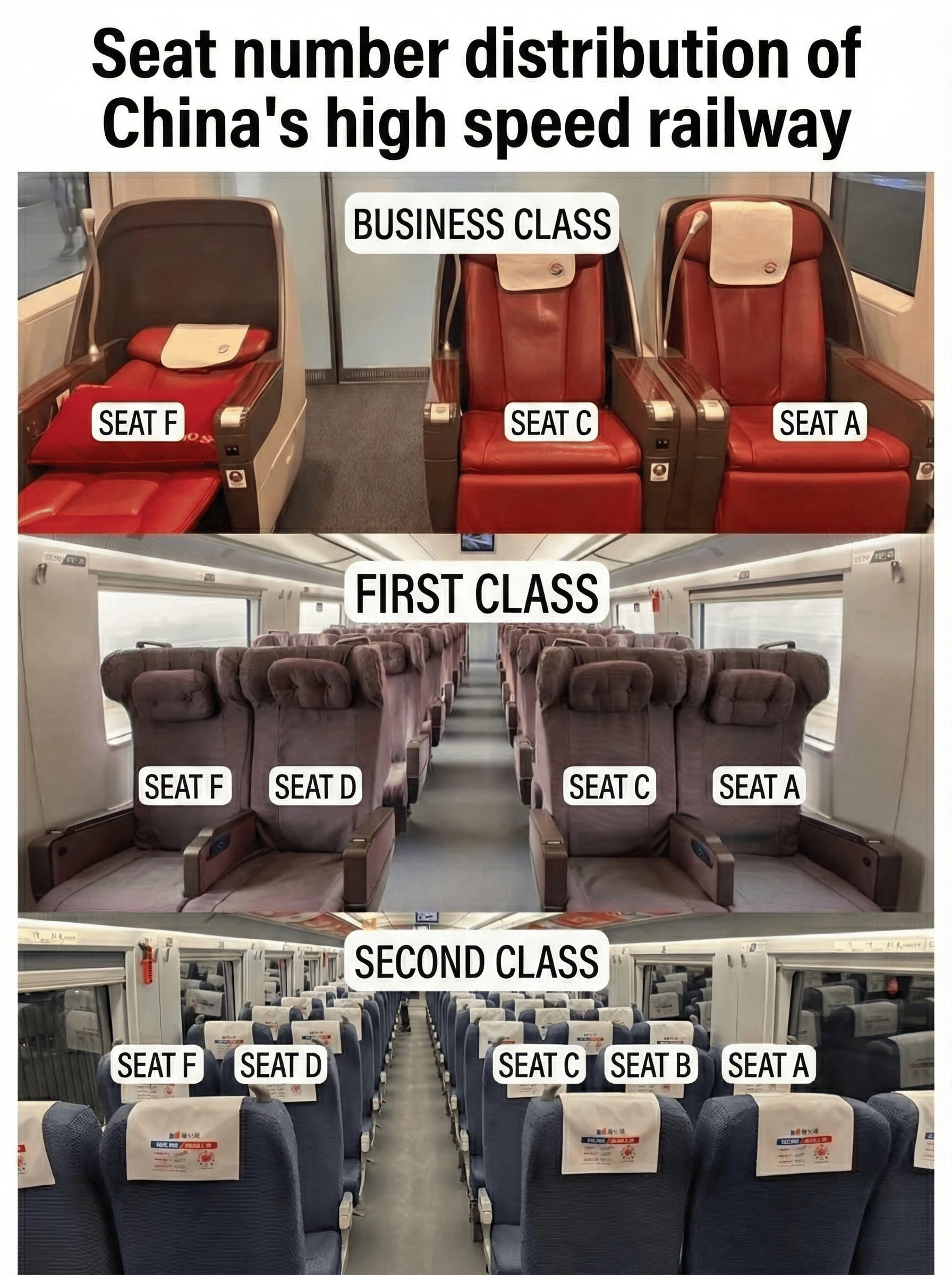
- Window (often A / F) for views.
- Aisle (often C / D) if you get up a lot.
- Middle (B) in second class—skip if you can; you sit between two strangers.
- Sleepers: lower bunk is easiest to climb into and sit on during the day. Book early.
Sitting together with kids is not automatic—see family seats FAQ.
Step 5: Pay and keep the e-ticket
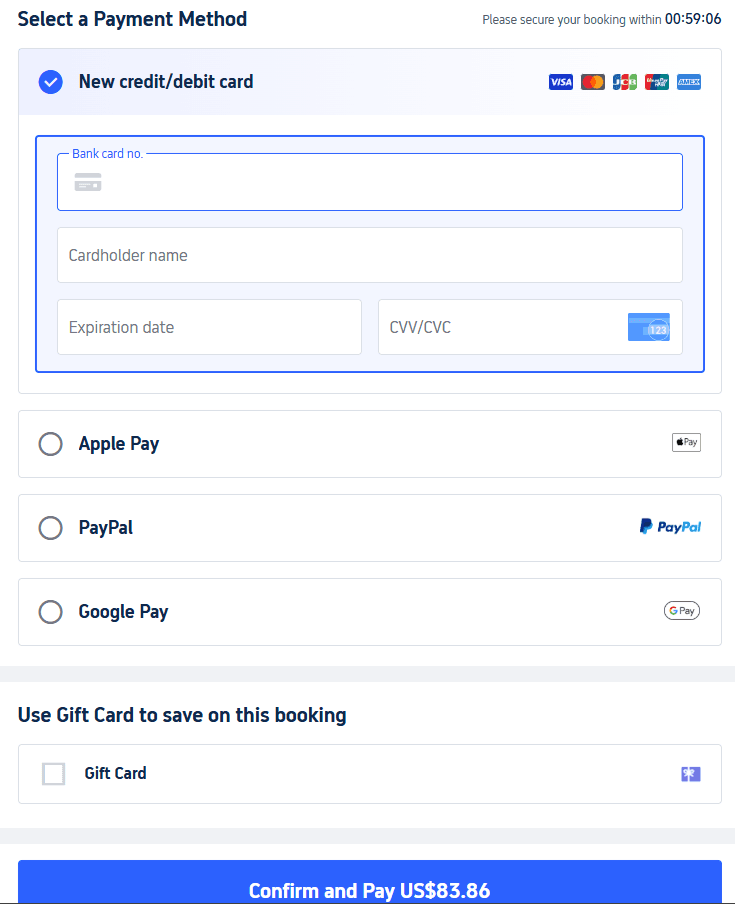
Pay with credit/debit card, PayPal, Apple Pay, or Google Pay when those options appear. After payment, save the in-app QR/order and a screenshot.
- On most high-speed trips you do not collect a paper ticket. Scan your passport (or use the manual foreigner lane) at the station gate.
- If payment fails, confirm whether an order was created before you pay again—see Trip.com payment failed guide.
Before you go to the station:
- Book early on Beijing–Shanghai and holiday weekends.
- Arrive about an hour early for security and the walk to the platform.
- Screenshot the order (station Wi-Fi is uneven).
- Carry the same passport you booked with—that is your boarding ID.
3. Which seat class to book (G/D and overnight)
Seat class is separate from the G/D/Z letter. Same train can have second, first, and business.
High-speed (G / D)
Second class
- Layout: 3+2 (five seats across).
- Feel: fine for under ~4 hours; power sockets are common but the cabin fills up.
- Who it fits: solo travelers and short hops. Avoid middle “B” if you are tall.
First class
- Layout: 2+2.
- Feel: wider seat, quieter, better for a laptop.
- Who it fits: trips over ~4 hours. Window/aisle letters still matter—check the live map.
Business class
- Layout: often 1+2.
- Feel: on many G trains you get a near-lie-flat seat plus lounge access at some stations. Snacks/tea vary by train.
- Who it fits: Beijing–Shanghai (~4.5 hours) if you want to sleep, not the everyday choice.
Overnight (Z / T / K)
Hard seat
Open coach seating. Loud, little privacy. Skip unless the budget is tight and the ride is short.
Hard sleeper
Open 6-bunk bay, no door. Upper bunks have very low headroom; lower bunk is the one people fight for.
Soft sleeper
Closed 4-berth cabin with a door. Better for light sleepers and families on 12+ hour legs.
4. How to cancel or change a Trip.com train ticket
China Railway refund rules apply whether you booked on Trip.com or 12306. Trip.com may also keep its own service fee—read the fee line on your order before you confirm.
1. Find the order. In the app or site, open bookings and select Trains (wording varies).
2. Request refund or change. Trip.com’s China train policy page says online change/cancel requests are handled within 08:00–20:00 (GMT+8) before departure. Source: Ticket change & cancellation policy.
3. Passport upload. Some refunds ask for a clear photo of your passport biodata page. Blurry shots get rejected.
4. China Railway refund fees (fare penalty; separate from any Trip.com fee), per the English 12306 FAQ:
- 8 days or more before departure: no railway refund fee.
- More than 48 hours before departure: 5% of the ticket price.
- 24–48 hours: 10%.
- Less than 24 hours: 20%.
Source: 12306 English FAQ — refund fee. Minimum fee rounding rules also apply. Confirm the amount shown for your ticket before you cancel.
After the train has departed, a normal online refund usually fails. Change options (same-day or later) depend on remaining seats and current railway rules—use the order screen, not a blog memory.
International-card refunds can take longer than domestic ones. Watch the Trip.com order status and your bank statement; do not assume a fixed day count.
5. Data and apps on the train
Carriage Wi-Fi and mobile data still sit behind the mainland firewall. Plan messaging and maps before you board.
- Data: a China eSIM on Trip.com you set up before the flight.
- Blocked apps: many travelers use Surfshark for Google / WhatsApp—install and test before you leave home.
FAQ
Can I book China train tickets on Trip.com with a foreign credit card?
Usually yes—that is the main reason foreigners use Trip.com instead of 12306. If checkout fails, check the payment failed guide before submitting a second payment. Book here: Trip.com trains.
How do I book China train tickets on Trip.com?
Search the route on Trip.com trains, enter passport details exactly, pick a seat class, and pay. The five steps above walk through each screen.
What if I miss my train?
Open the order and use whatever change/rebook options Trip.com still shows. Same-day changes often need leftover seats; rules after departure are stricter and may need a station window. Confirm on the order, not from memory.
Can I take trains during 240-hour visa-free transit?
Yes, but only inside the allowed region for your entry port. Example: enter via Shanghai and you can usually ride to Hangzhou or Suzhou—not jump to Beijing. Check 240-hour visa-free transit.
Is there luggage space on China high-speed trains?
Yes. Large bags go on the racks at the carriage ends; smaller bags fit in the overhead bins. Soft bags are easier to lift than rigid spinner cases.
Trip.com or 12306—which should I use?
Trip.com for English + foreign cards from abroad. 12306 if you can handle Chinese UI and want to avoid the service fee. Longer comparison: Trip.com train booking review.