Payments · Alipay+ · 2026
Alipay+ Foreign Wallets in China (2026): Scan QR Without a Mainland Account
Some travelers from Asia can pay in mainland China with their home e-wallet (Kakao Pay, Touch ’n Go, and others) through the Alipay+ network—scanning the same merchant QR codes locals use. Coverage is broad but not universal; wallet lists change—verify on official Alipay+ pages before you fly.
Bottom line: if your home wallet is an Alipay+ partner, you may pay at many mainland QR merchants without downloading the Chinese Alipay app—open your wallet, use Scan or Present, and confirm FX on screen. Everyone else should still set up tourist Alipay or WeChat Pay plus cash backup per our payment guide.
What Alipay+ is (and what it is not)
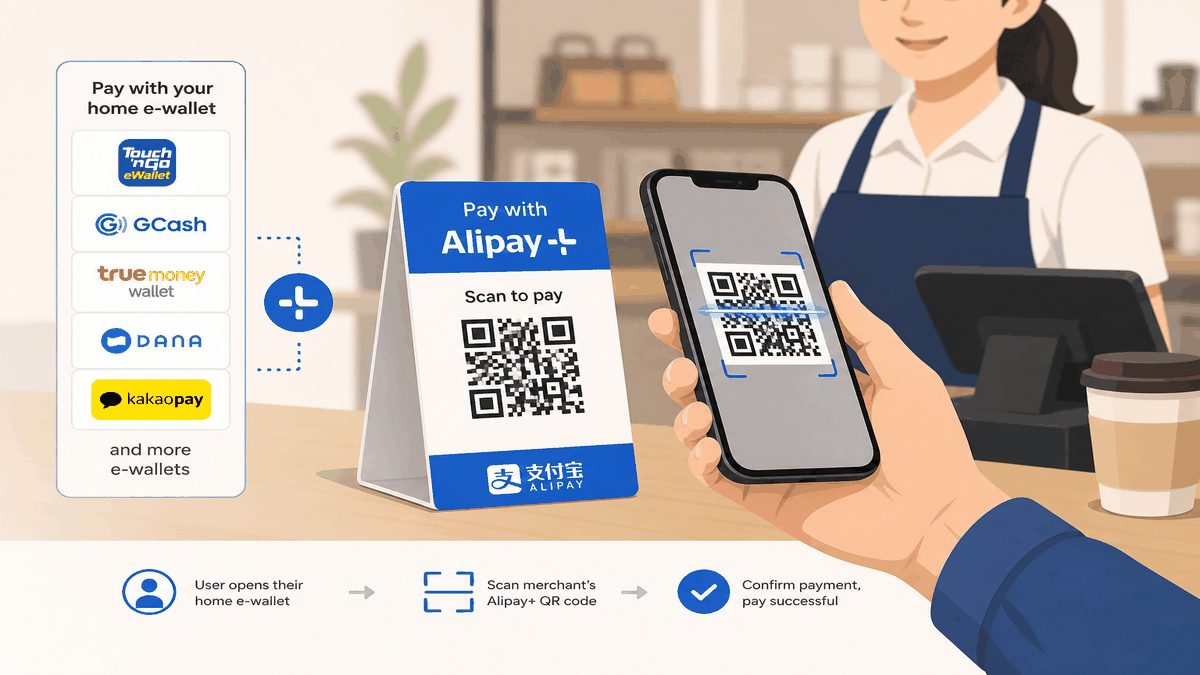
Alipay+ is Ant International’s cross-border payment network: merchants integrate once, and customers can pay from multiple partner wallets. On the Pay in the Chinese mainland page, Alipay+ describes two flows—scan the merchant’s QR or present your payment code for the cashier to scan.
It is not the same product as the tourist “international version” of the Alipay app that Western visitors download and link to Visa/Mastercard. Alipay+ is the rails behind some Asian wallets; the Alipay consumer app is one wallet among many on the network.
Alipay+ states that tens of millions of merchants across mainland China accept these methods, with FX rates updated on business days and no extra Alipay+ fee on top (your home wallet may still show its own limits or authentication steps).
How to pay: Scan vs Present
Confusing Scan and Present is the most common self-inflicted error—same as standard Alipay. Our payment guide calls this out explicitly; the Alipay+ mainland page uses the same split:
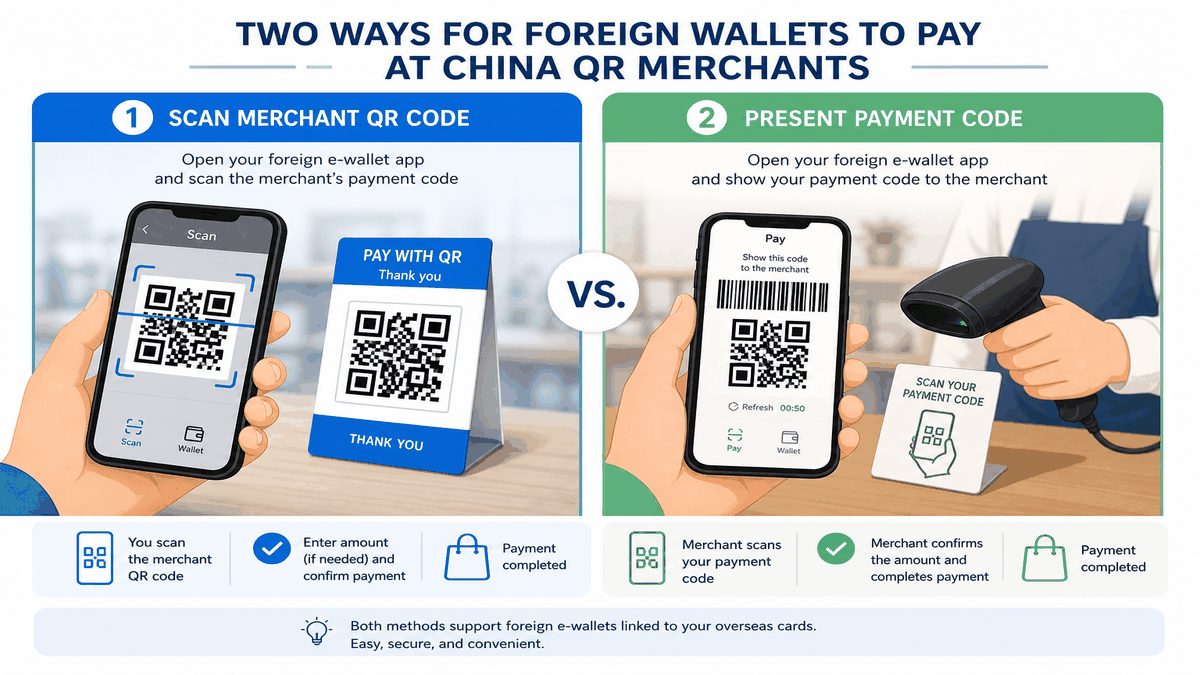
Scan and pay (you scan the merchant)
- Open your partner e-wallet (not necessarily the Alipay app).
- Choose the cross-border / overseas payment entry if your wallet labels it that way.
- Tap Scan and point at the merchant’s static or dynamic QR at the counter.
- Enter the amount (if prompted), confirm FX, and complete authentication in your home app.
Present and pay (merchant scans you)
- Open your wallet’s payment code screen (barcode/QR facing the cashier).
- Let the merchant scan with their handheld or fixed scanner.
- Confirm the amount on your phone before the charge finalizes.
Partner wallets: verify before you travel
The table below is a traveler-reported summary of wallets commonly named in Alipay+ press materials and the mainland payment page. It is not an official error-free directory—partners may be added or paused without a public blog update.
| Wallet (verify in your app) | Typical home region | Notes from public Alipay+ materials |
|---|---|---|
| Kakao Pay | South Korea | Early pilot partner; scan/present at Alipay+ merchants per Ant announcements |
| Touch ’n Go eWallet | Malaysia | Listed among wallets welcomed to mainland QR acceptance |
| AlipayHK | Hong Kong SAR | Widely cited for mainland retail and some metro scenarios |
| mPay | Macao SAR | Named in 2023 Alipay+ expansion release |
| GCash | Philippines | Often listed in Alipay+ global partner materials—confirm China toggle in-app |
| TrueMoney | Thailand | Named in Ant Group wallet expansion announcements |
| Naver Pay / Toss Pay | South Korea | Appeared in 2023 “Alipay+-in-China” program announcements |
| Changi Pay / OCBC Digital | Singapore | Listed in same expansion communications—check live status in-app |
Before departure: update your wallet app, complete any KYC or cross-border enablement, and run a small test payment at home if the wallet offers a demo merchant. Alipay+ notes wallets may require identity authentication or channel limits.
How to tell if a merchant accepts Alipay+
According to Alipay+ consumer FAQ wording, look for Alipay+ branding at checkout (except for special occasions or restricted venues). In practice, many stalls display a generic blue Alipay QR—acceptance may still work through the network, but declines happen at small cash-only vendors, some transport kiosks, and person-to-person transfers.
- Usually smoother: chain convenience stores, supermarkets, malls, branded cafes, many restaurants with counter QR stands.
- Often harder: rural market cash lanes, deposit-only scenarios, tips to individuals, some hospital windows.
- Metro / bus: varies by city; do not assume your foreign wallet works on every transit QR gate without checking local notices.
Alipay+ wallet vs downloading Alipay with a foreign card
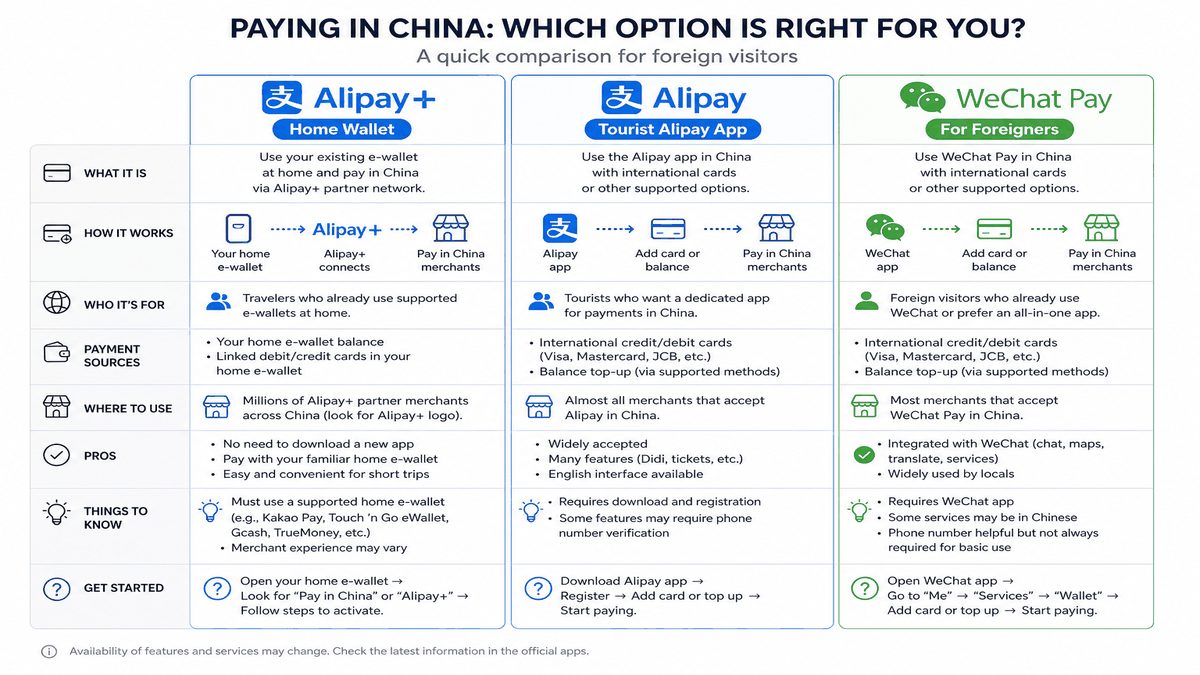
| Path | Best for | Trade-offs |
|---|---|---|
| Home wallet via Alipay+ | Travelers who already use a listed Asian e-wallet daily | Depends on partner status; FX shown in home app; support is your wallet’s CS |
| Tourist Alipay + intl card | Visitors without a partner wallet; need metro/taxi/online features | Setup + verification; see Alipay guide |
| WeChat Pay + intl card | Social payments, some mini-programs, friends in China | Separate setup; not interchangeable with Alipay QR in every shop |
Many experienced travelers carry two rails (Alipay and WeChat) even when one wallet works—stalls sometimes show only one QR family.
When payments fail
Work through these before assuming China is “cashless only”:
- Wrong flow: you Presented when the merchant needed you to Scan (or vice versa).
- Cross-border switch off: enable overseas payment in your home wallet settings.
- Limit or risk block: large first transaction abroad—try a smaller amount or contact wallet support.
- Merchant not on network: pay cash or ask if they accept international cards.
- Account verification incomplete: finish KYC on hotel Wi-Fi before you hit street stalls.
Full decline tree: Alipay / WeChat Pay not working in China.
FAQ
Can I use Kakao Pay everywhere Alipay works?
Not guaranteed. Alipay+ aims for wide merchant coverage, but individual stalls, transit gates, and mini-programs may still require the Chinese Alipay or WeChat apps. Treat Kakao Pay as a strong retail option, not a 100% substitute.
Do I pay extra FX fees through Alipay+?
Alipay+ states no additional Alipay+ fee; you still see conversion on the payment screen. Your issuing wallet or bank may apply its own FX or cross-border rules—check your bill.
I am from the US/EU with no Asian e-wallet. Should I use Alipay+?
Probably not. Set up tourist Alipay with your international card instead. Alipay+ foreign-wallet paths target travelers who already hold partner apps.
Where do I see the exchange rate?
Alipay+ FAQ says rates appear on the payment page or bill details in your wallet. Screenshot for expense tracking if your employer needs receipts.
Payment declined—who do I contact?
Start with your e-wallet customer service (Alipay+ routes the charge to your home wallet). If you are using tourist Alipay instead, use Alipay in-app help numbers listed on official help pages.
This page has no commercial booking links. For card binding, cash backup, and metro deposits, see our Ultimate China Payment Guide.