Digital Survival Kit · Payments
How to Use Alipay in China (2026): Visa & Mastercard for Tourists
China is post-cash. Street vendors, metro gates, and hotel deposits all expect a QR scan—not a mag-stripe swipe. In 2026 the winning move is direct card binding before you land, plus a WeChat Pay backup on your phone.
You do not need a Chinese bank account to pay in Shanghai or Beijing. Link your home-country Visa, Mastercard, JCB, or Discover inside the Alipay app, complete passport verification, and keep 200–500 RMB cash for the one vendor whose personal QR code rejects foreign cards.
People’s Bank of China (PBOC) guidance continues to push better international-traveler support on major wallets. Rules, fee caps, and merchant acceptance still shift—treat this page as a 2026 field guide, not legal advice. For the wider payment stack, see our first-hour app setup guide.
The 2026 standard: direct international card binding
Direct binding means your foreign card settles through Alipay at scan time—no RMB top-up wallet required for most tourist purchases. We still recommend setting up WeChat Pay as a foreigner on the same trip; when one app glitches, the other often works.
Deeper context on limits without a Chinese account: Alipay tourist use without a Chinese bank account.
Regional availability: what to expect
Success rates depend on city tier, merchant terminal, and your home bank’s fraud filters.
| City tier | Shopping & dining | Metro / bus QR | Int’l card success (typical) |
|---|---|---|---|
| Tier 1 (Shanghai, Beijing, etc.) | Very high | Direct scan widely supported | High (~95%+) |
| Tier 2 (Hangzhou, Chengdu, etc.) | High | QR supported | Medium-high (~85%+) |
| Tier 3 & smaller | Moderate | Limited; cash backup | Moderate (~70%+) |
Occasional declines are normal. If payments fail repeatedly, work through our Alipay & WeChat Pay troubleshooting checklist before you assume the card is dead.
Step-by-step: setting up Alipay for success
Prioritize Alipay over WeChat for your first wallet: passport verification is usually more automated for international profiles.
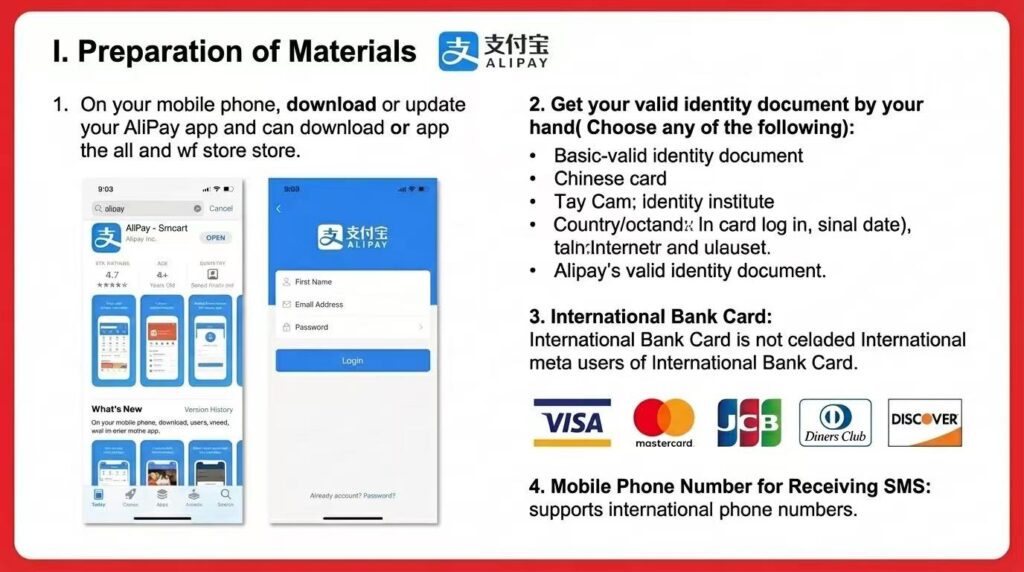
- Download & register: Install Alipay from your official app store. Register with your home-country mobile number (international SMS supported).
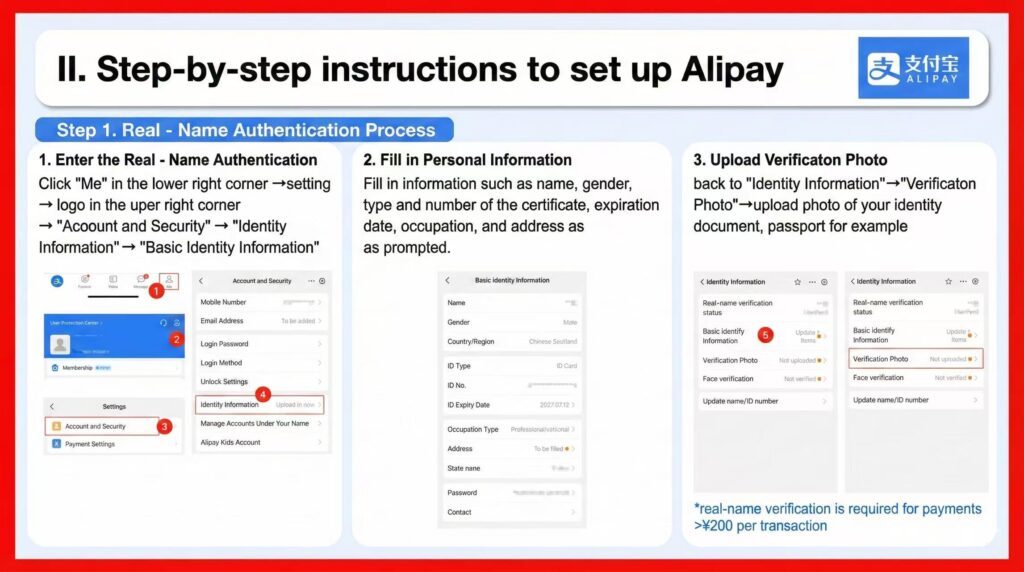
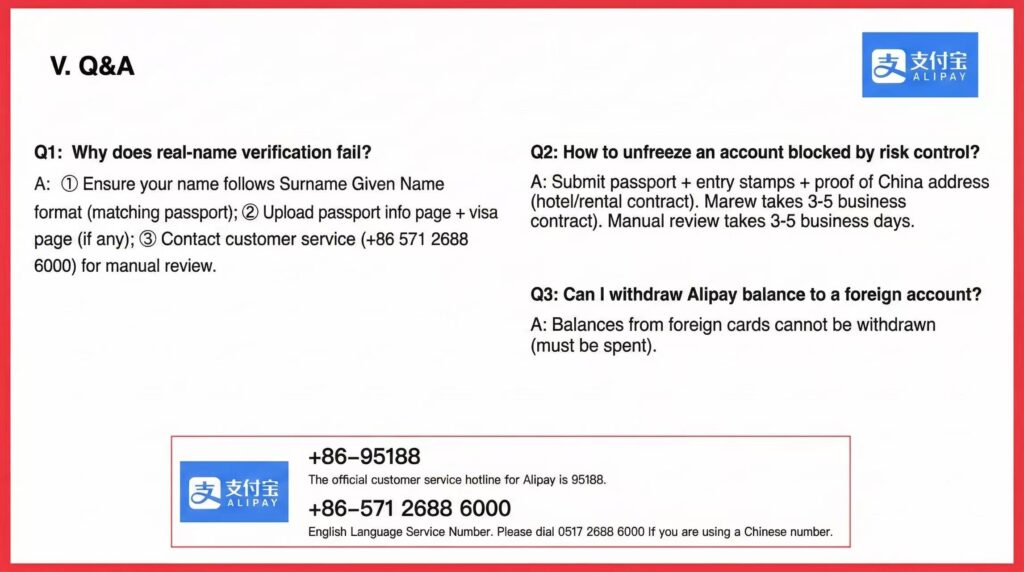
- Verify identity: Me → Settings (gear) → Account and Security → Identity Information → upload passport data page (and visa page if prompted). Use Surname GivenName exactly as printed. Real-name verification is required for many payments above 200 RMB per transaction.
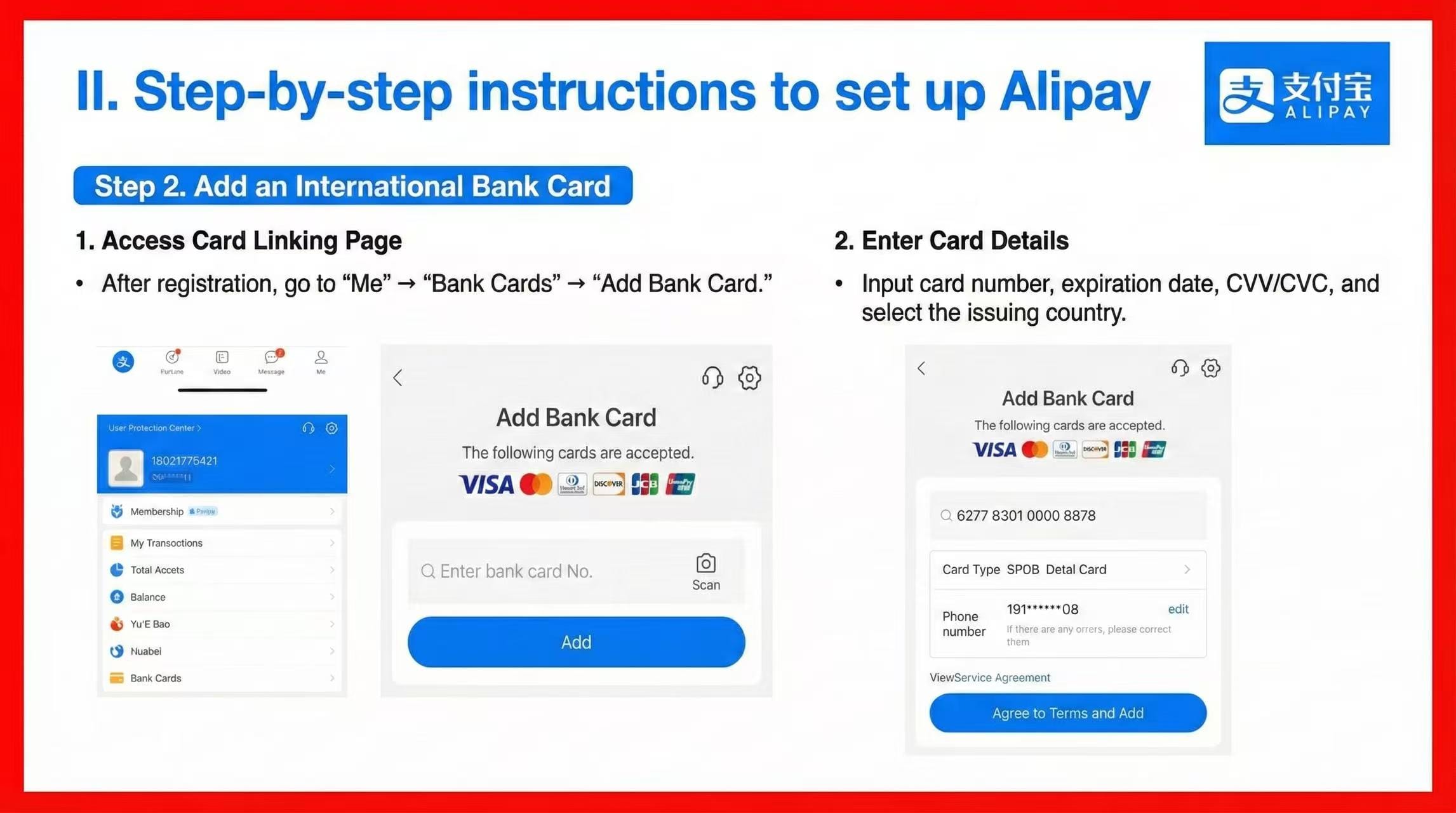
- Link your card: Me → Bank Cards → Add Bank Card. Enter Visa/Mastercard number, expiry, CVV, and issuing country.
- Confirm connectivity: Complete setup on hotel Wi-Fi or home Wi-Fi, then switch to mobile data before your first street payment. Public airport Wi-Fi often drops mid-verification.
Do this before immigration
Activate a China-ready data plan so SMS codes and face verification do not stall on captive portals. Trip.com China eSIM or Airalo — see VPN vs eSIM if you split roaming and hotel Wi-Fi.
The “NFC hack”: Apple Pay for transit
Retail counters want QR codes—Apple Pay tap rarely replaces them. Transit is different: many cities support China T-Union cards in Apple Wallet. Top up with your bound international card via Apple Pay, then tap phone or watch at metro turnstiles.
- Benefit: Works when cellular data is weak or battery is low (Express Mode).
- Check coverage: Verify your city on the official China T-Union supported-city list before you rely on it.
- Metro QR backup: See our China metro payment guide if turnstiles reject both NFC and Alipay scan.
Fees and financial strategy
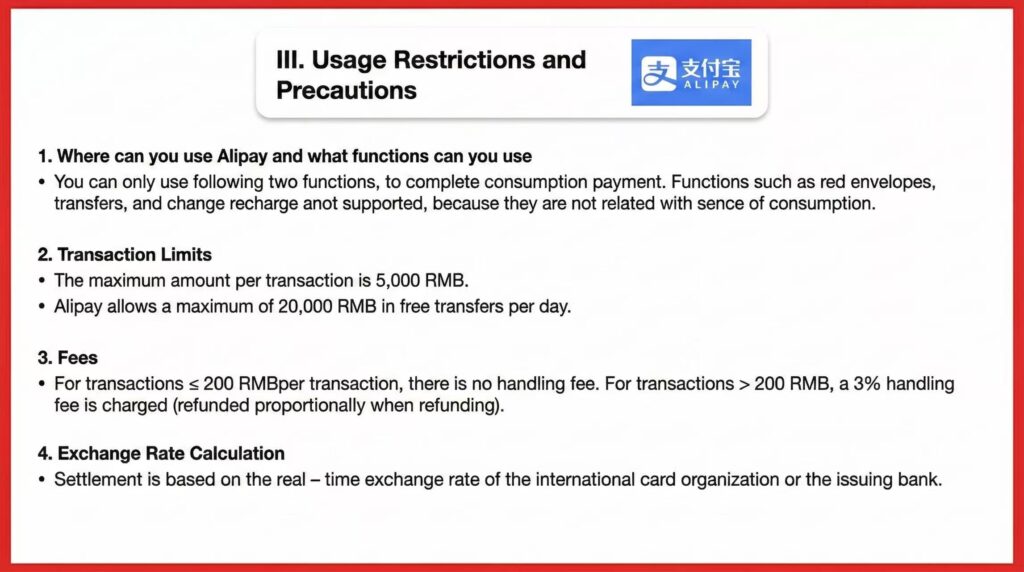
- 200 RMB line: Single transactions ≤200 RMB typically incur no Alipay service fee on foreign cards; above 200 RMB, expect about 3% (refunded proportionally if the merchant refunds).
- Split-payment tactic: On a 500 RMB bill, ask politely: “Can we do three payments—200, 200, and 100?” Many merchants comply to help you avoid the fee.
- Your bank still charges FX: Card-network conversion fees are separate from Alipay’s 3% line item.
Troubleshooting when the transaction fails
- Bank fraud blocks: Approve the charge in your banking app. If your bank app will not load in China, you may need roaming data or a VPN to reach overseas banking—see VPN rules for tourists.
- Personal QR codes: Small vendors sometimes display personal WeChat/Alipay codes that reject international cards. Carry 200–500 RMB in small notes.
- Hotel security deposits: Avoid Alipay for refundable hotel holds; international-card refunds can take up to 21 days. Use a physical credit card or cash.
- Trains & flights: Book early on Trip.com trains and Trip.com flights so payment is confirmed before you reach the station.
Scan vs. show your code (daily use)
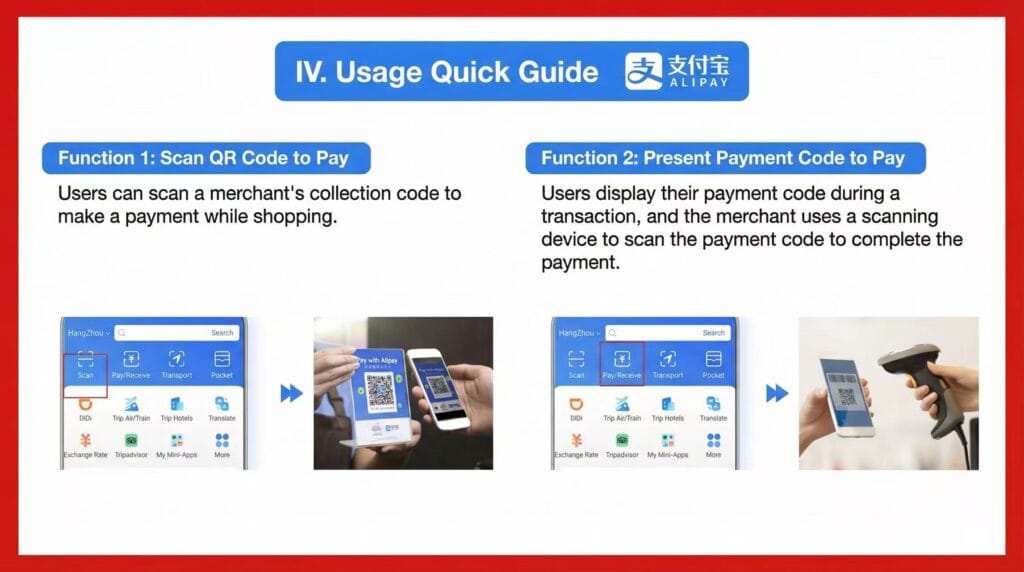
Scan (home-screen camera icon): you scan the vendor’s static QR—ideal for street food, taxis with a dashboard code, and market stalls.
Pay/Receive: you display your barcode; the cashier scans you—standard in supermarkets, chain coffee, and malls. If one mode fails, try the other before you assume the card is blocked.
Next backup: finish WeChat Pay registration so a declined Alipay scan is not a dead end.
Bottom line
Bind your international card in Alipay at home, verify passport details once, activate eSIM before immigration, and keep WeChat Pay as plan B. For the rest of the trip stack—hotels, trains, and tours—use one bookmarked Trip.com tab.
FAQ: 2026 travel payments with Alipay
Can foreign tourists use Alipay in China?
Yes. Link an international Visa or Mastercard (or supported networks) and complete passport verification. No Chinese bank account is required for typical tourist spending.
Does Alipay accept Visa and Mastercard?
Major tourist zones accept foreign cards through Alipay’s international integration. Tier-3 towns and personal QR codes are the usual failure points—carry cash backup.
How do I set up Alipay before arriving?
Download from your official app store, register with your home number, verify passport, link card, and run a small test payment on data—not airport captive Wi-Fi alone.
Can I use Alipay without a Chinese bank account?
Yes—direct foreign-card binding is the default tourist path in 2026. See our no Chinese bank account guide for edge cases.
Are there fees with a foreign card?
Alipay often charges ~3% on single transactions above 200 RMB; your card issuer may add foreign-transaction fees separately. Split large bills under 200 RMB when merchants agree.
Why did real-name verification fail?
Match passport name order, upload a sharp data-page photo (plus visa if asked), and call English support +86-571-2688-6000 for manual review if the app keeps rejecting.