Digital Survival Kit · Transport
China Metro Payment Guide: What Actually Works at the Gate (2026)
Shop QR codes do not open turnstiles. Use a city Transport ride code, an NFC transit card, a machine ticket—or, in Beijing and Shanghai, an eligible overseas contactless bank card where the operator has published tap-to-ride.
China’s metros run on local digital rails: a dedicated Transport QR inside Alipay or WeChat, an NFC transit card in your phone wallet, or a single-journey token from a station machine. Your merchant payment code is not the same thing as the ride code.
Rules differ by city. Treat this as a 2026 playbook for tourist-heavy hubs, then confirm the operator notice for your first station if you plan to rely on overseas bank-card tap.
Transport QR
Best default for short trips. Activate the correct city in Alipay Transport or a WeChat transit mini program, then show the live ride QR.
NFC transit card
Fast at rush hour. Add a T-Union or city card to Apple Wallet or a supported Android wallet, top up, then tap the reader.
Machine ticket
Backup for dead phones, kids without devices, or a failed digital setup. Kiosks often take Alipay/WeChat QR more than cash.
Before you commute: finish Alipay and WeChat Pay on Wi-Fi, confirm a ride code loads while you still have hotel signal, then bookmark Trip.com for trains and hotels. Full payment context: Ultimate China Payment Guide.
Overseas bank-card tap: Beijing and Shanghai (official)
Do not assume every Chinese metro takes foreign Visa/Mastercard at the gate. Two hubs have published network-level tap-to-ride for overseas contactless cards:
- Beijing: As of mid-June 2025, Beijing’s urban rail network supports contactless tap-and-go with China UnionPay, Mastercard, Visa, JCB, and American Express across listed lines and stations—see the Beijing Municipal Government English notice.
- Shanghai: Effective 28 June 2025, Shanghai Metro announced expanding its Tap to Ride pilot with eligible UnionPay, Visa, Mastercard, American Express, and JCB contactless cards (plus qualifying e-CNY hard wallets) across the urban rail network—see the Shanghai government English release. Cards may need small-amount password-free payment enabled; dual-brand cards can behave differently—follow station signage if a tap fails.
Elsewhere, plan on Transport QR, NFC transit balance, or a machine ticket. Even in Beijing and Shanghai, keep Alipay Transport ready: not every card issuer, chip type, or wallet form factor is accepted.
Option 1: Transport QR (best default for short stays)
For most visitors under two weeks, a ride QR inside Alipay or WeChat is still the nationwide baseline. You avoid buying a physical card and you skip coins. The usual failure is not “the app is broken”—it is the wrong city selected, an unsigned transit agreement, or showing the shop Pay code instead of Transport.
Using Alipay for metro rides
Alipay often shows clearer English labels for transport than WeChat. Link an international card first, then treat city selection as a manual check every time you change hubs.
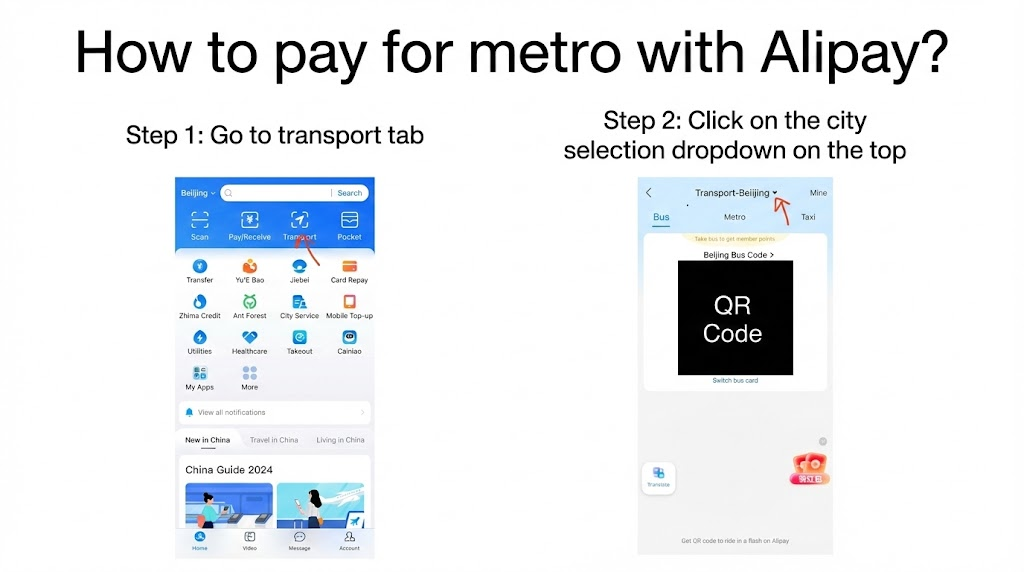
- Open Alipay and tap Transport (sometimes labeled Travel). If you only see hotels/flights-to-china/ and no metro ride option, try again after you have mainland data or Wi-Fi—travelers often report the public-transport panel is empty from abroad.
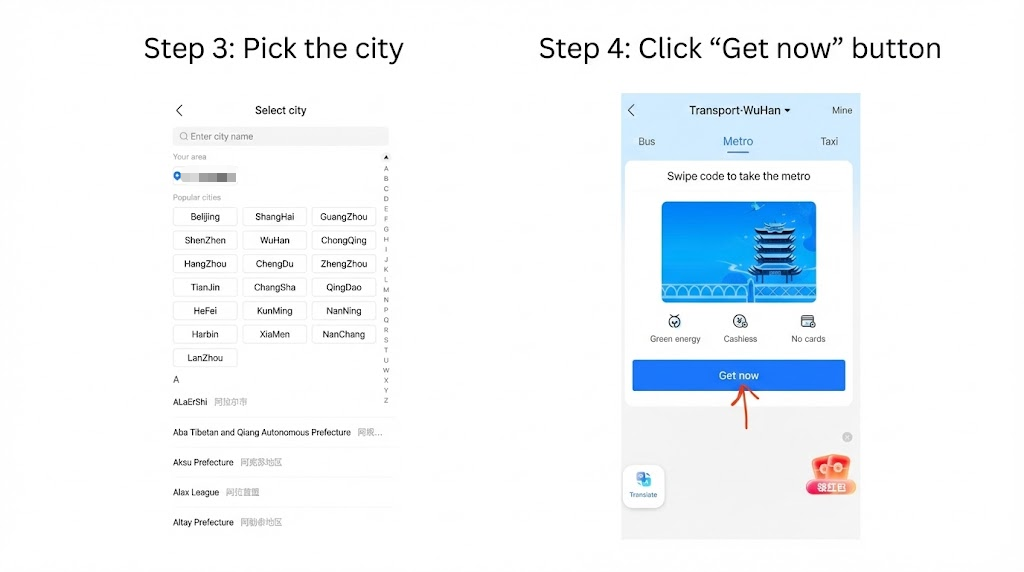
- City mismatch is the main glitch: open the city dropdown and pick where you are riding (for example Shanghai, Beijing, or Wuhan). Auto-location is unreliable if your SIM or account still “lives” elsewhere.
- Tap Get now (or the local equivalent) to activate the electronic card. Skipping the service agreement or real-name prompts can leave the QR area blank.
- Open the live ride screen, raise brightness slightly, and hold the QR to the turnstile scanner until it beeps. The gate reads your phone; you are not scanning a wall poster.
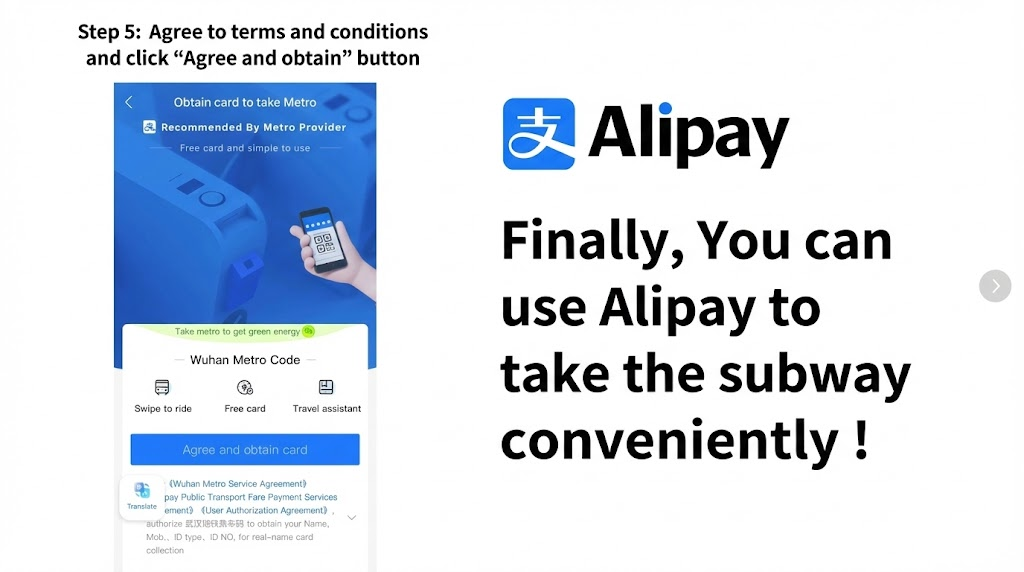
If payments are not bound yet: How to Use Alipay in China (2026). Stuck later: Alipay / WeChat Pay not working.
Using WeChat for metro rides
WeChat routes metro payments through Mini Programs. Names differ by city—search for the official metro ride code or a city-branded transit pass (乘车码). Some travelers report a mainland (+86) number prompt; if that blocks you, switch to Alipay Transport for that city.
- In search, type metro, your city name plus “metro code,” or ride code, then open the official mini program.
- Choose the correct city and start activation (buttons such as To use or Apply for Metro Card—wording varies).
- Approve the small-amount auto-deduction when WeChat Pay prompts you; without it, the ride QR may not stay active.
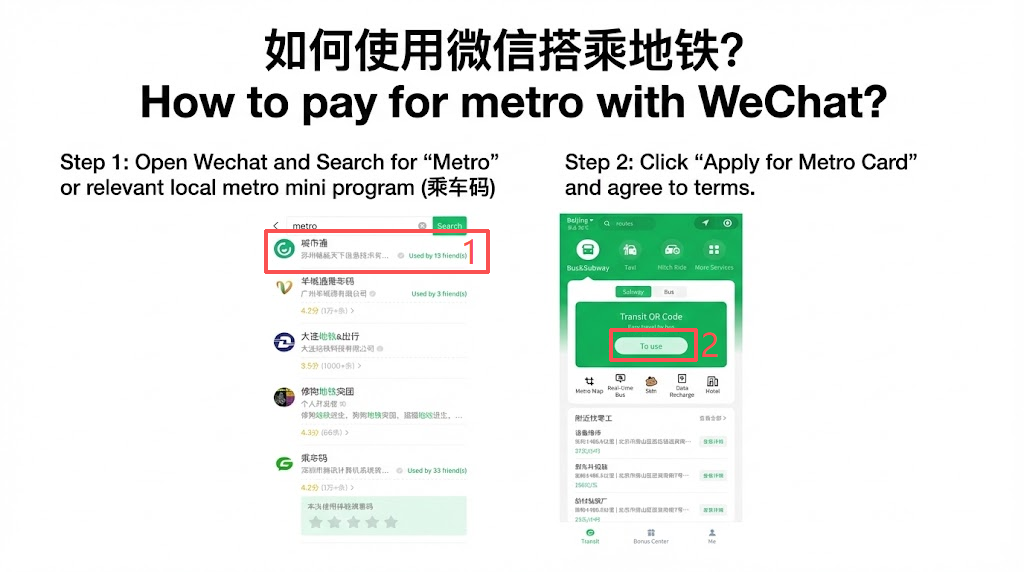
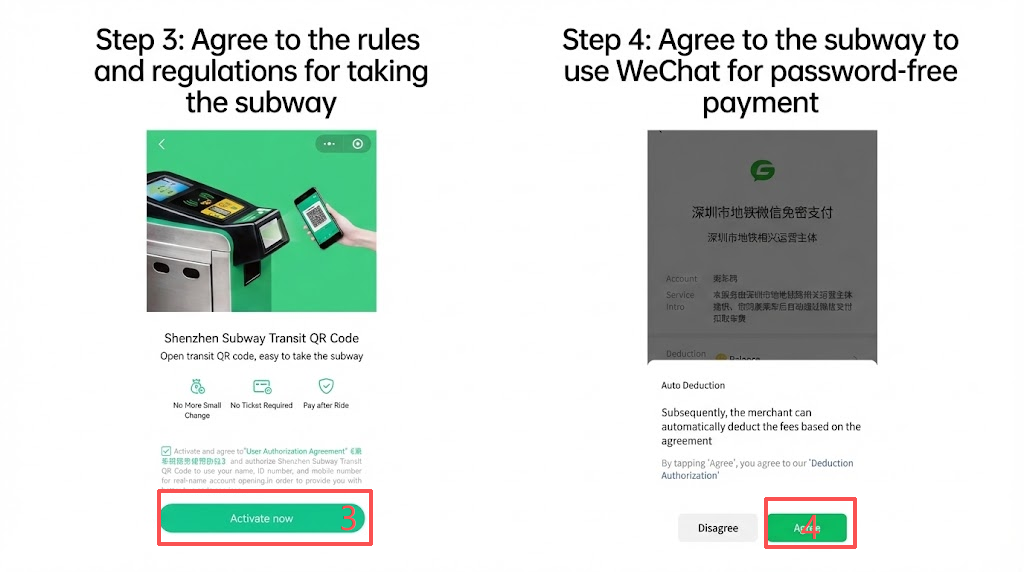
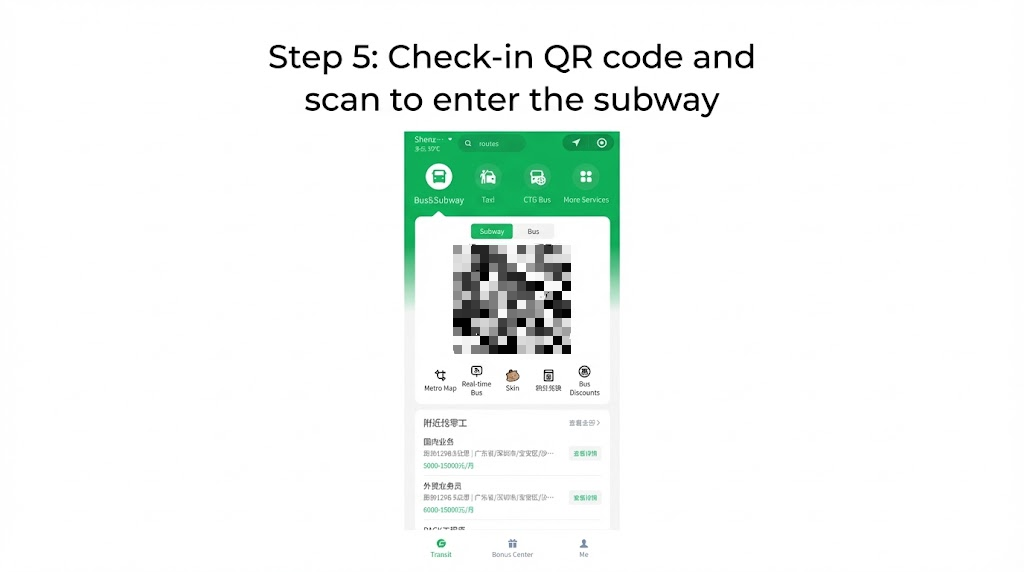
Ride codes refresh on a short timer. A saved photo can look valid and still fail at the gate. Keep the official screen open, brightness up, and the code centered over the scanner.
Card binding for WeChat Pay: WeChat Pay for Foreigners and registration guide.
Option 2: NFC transit cards (repeat riders)
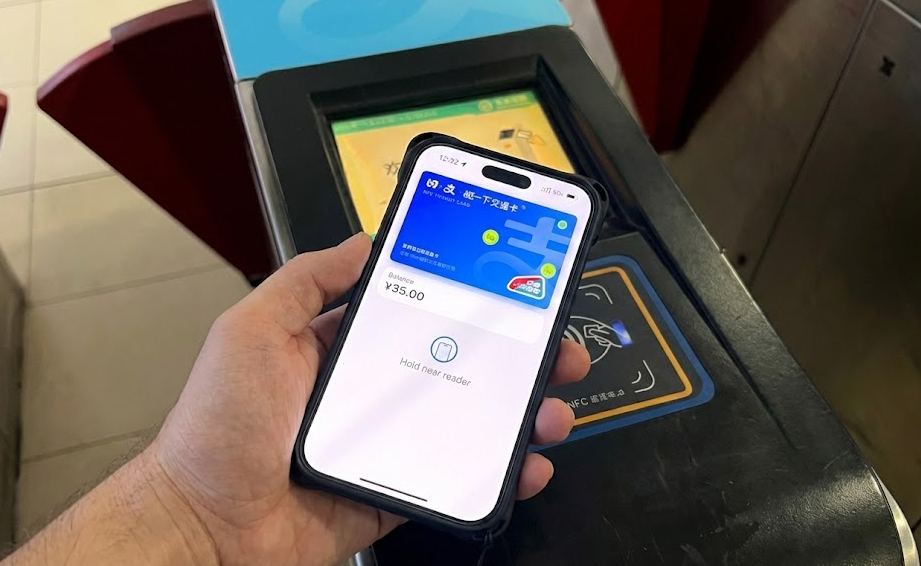
NFC is useful when opening a QR would slow a queue. Tap the phone to the reader; many setups work with the screen off after the default card is set. Availability and top-up options vary by phone, OS version, and city brand.
How to set it up
- Wallet app: add a Transit Card and search your first city (Beijing, Shanghai, and other T-Union brands often appear).
- Intercity use: some T-Union cards work across cities when the reader shows the same alliance logo—verify locally; exceptions exist.
- Top-up: load balance with a linked method. Apple Pay top-ups sometimes accept foreign cards even when the turnstile itself does not read foreign plastic.
- At the gate: touch the phone to the NFC pad until you hear the beep and the gate opens.
If the reader flashes red
- Wait a beat before tapping again—double taps can register as duplicate entry.
- Confirm the active card in the wallet matches the city you are in.
- After two failures, step to the service window; staff can often clear a stuck card state on their terminal.
Option 3: Ticket machines (backup)
Use machines when a phone dies, a child has no device, or digital onboarding fails. Newer kiosks often offer an English toggle.
- Switch the touchscreen to English if offered.
- Select line, then destination; pay with Alipay or WeChat at the QR on the screen when available.
- Collect the plastic token or paper QR slip. Tap or insert on exit exactly as the gate signage shows.
Major rail hubs and airport metro platforms can stack confused travelers with luggage. If the queue is deep and your connection is tight, switch to taxi or ride-hail—How Foreigners Grab a Taxi in China (2026). Broader context: China transportation guide for foreigners.
Critical rules and practical backups
Connectivity
Corridors can have strong mobile data; stairwells and deep platforms still drop signal. Open your ride QR while you have bars, not after you are trapped behind five people at the gate.
Compare options in Trip.com eSIM vs Airalo / Holafly. Either beats guessing whether home-carrier roam will stay up at walking speed.
One person, one code
Do not hand one phone through the gate twice in a row for two people. Systems expect one entry token per passenger. Pair travelers without phones with a machine ticket or a second device.
Maps, VPN, and what still needs a tunnel
Metro mini programs and Alipay run on the local network. Google Maps and several Western messaging apps generally do not. Most visitors pair a data SIM or eSIM with a VPN for map sanity—see Google Maps vs Amap and eSIM vs VPN.
Install VPN apps before you fly. Live VPN pages can be blocked inside mainland China.
Lock logistics before you ride
Hotels near a single metro line cut transfers and morning crush. High-speed rail tickets in the same booking stack keep train and hotel confirmations together. Prefer foreigner-friendly hotels when passport registration matters.
Bottom line
Activate Alipay or WeChat Transport for your first city before you leave reliable Wi-Fi, keep NFC or a machine ticket as backup, and treat Beijing/Shanghai overseas-card tap as a bonus—not your only plan. Stack payments, VPN, and eSIM from the China Digital Survival Kit or the first-hour app setup.
FAQ
What is the easiest method on day one?
Alipay Transport in English, manual city selection, then the live ride QR at the gate. In Beijing or Shanghai you can also try an eligible contactless overseas card, but still keep Transport QR ready.
Why is my Alipay Transport screen blank?
Common traveler-reported causes: wrong city in the header, incomplete card binding, an unsigned transit agreement, or opening Transport while still outside mainland China. Walk backward through activation until you see a confirmed ride code.
What if I forget to tap out?
Operators often treat an incomplete journey as a problem on the next entry (for example a fare hold or temporary block). Station service staff can usually clear it after you explain—fees and rules are city-specific, so ask at the window rather than assuming a fixed amount.
Can two people share one phone?
No. Buy a second ticket at a machine or activate a second device.
Can I tap my foreign Visa everywhere?
No. Published full-network overseas-card tap is confirmed for Beijing and for Shanghai’s Tap to Ride pilot expansion (June 2025 notices linked above). Other cities: assume Transport QR or machine tickets unless that city’s operator says otherwise.