Great Firewall · Messaging
Does WhatsApp Work in China? (2026)
WhatsApp is blocked on mainland networks. Without VPN you get Network Issue popups and one gray tick forever. With paid VPN + mobile data, messages deliver—but locals still expect WeChat.
Does WhatsApp work in China? For text, voice, and video on the mainland, only with VPN (and reliable data). Hong Kong and Macau are different. Chinese hotels, guides, and drivers reply on WeChat—not WhatsApp—even if your VPN is perfect.
Mainland = blocked · Fix = VPN + eSIM/roaming · Locals = WeChat · Install both before landing
Why WhatsApp fails (it is not your SIM)
WhatsApp traffic goes to Meta’s servers. The Great Firewall blocks WhatsApp, Facebook, Instagram, and related endpoints the same way it blocks Gmail. Switching from hotel Wi-Fi to China Mobile 5G does not remove the block—you are still on a mainland path unless VPN tunnels out.
web.whatsapp.com on a laptop is blocked too. Same fix: VPN first, then browser.
What you see without VPN
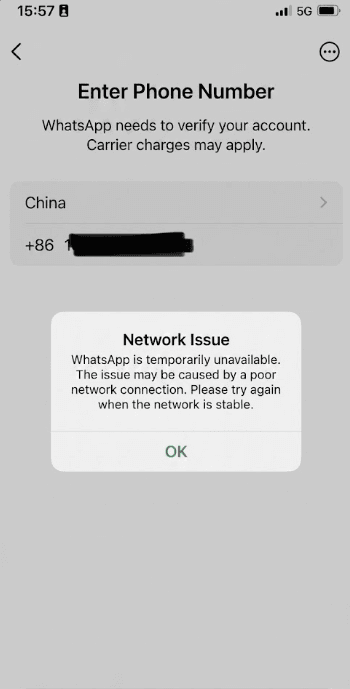
- Setup: “Network Issue—WhatsApp is temporarily unavailable” when verifying your number.
- Messages: Stuck on one gray tick (sent from your side but not delivered).
- Calls: Ringing then fail, or never connect.
- Media: Photos and voice notes hang on upload.
Before you fly: 7-step setup
- Install WhatsApp and complete registration at home with your home number.
- Install a paid VPN from your home app store; log in and test.
- Buy a China travel eSIM or confirm roaming works for data. Compare eSIM guides or Airalo.
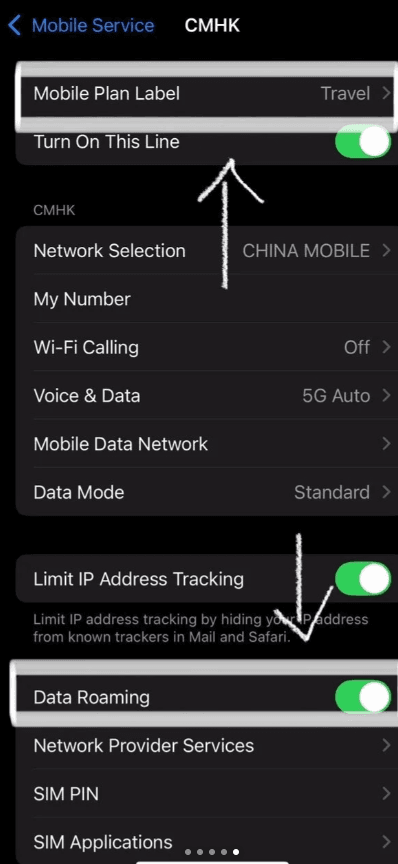
- On iPhone/Android: Settings → Mobile / SIM → turn on your travel line and Data Roaming for that plan.
- Connect VPN → send a test WhatsApp to a friend → confirm double gray ticks (delivered).
- Install WeChat and link WeChat Pay for local contacts.
- Export chat backups if you rely on history (Settings → Chats → Chat backup). Do not assume iCloud/Google backup will restore easily mid-trip without VPN.
SMS verification
Registering WhatsApp with a +86 Chinese SIM is uncommon for short trips. Most travelers keep their home number and use roaming SMS for verification codes when WhatsApp asks. If SMS fails, try again on home Wi-Fi before departure.
Daily routine on the ground
After every phone unlock or long sleep:
- Confirm mobile data (eSIM line active).
- Connect VPN (wait for “Connected”).
- Open WhatsApp for family/friends abroad.
- Use WeChat for hotel, guide, and DiDi driver (no VPN needed).
Voice and video calls over VPN work but often have higher latency than at home. Text and photos are the reliable use case.
With VPN connected
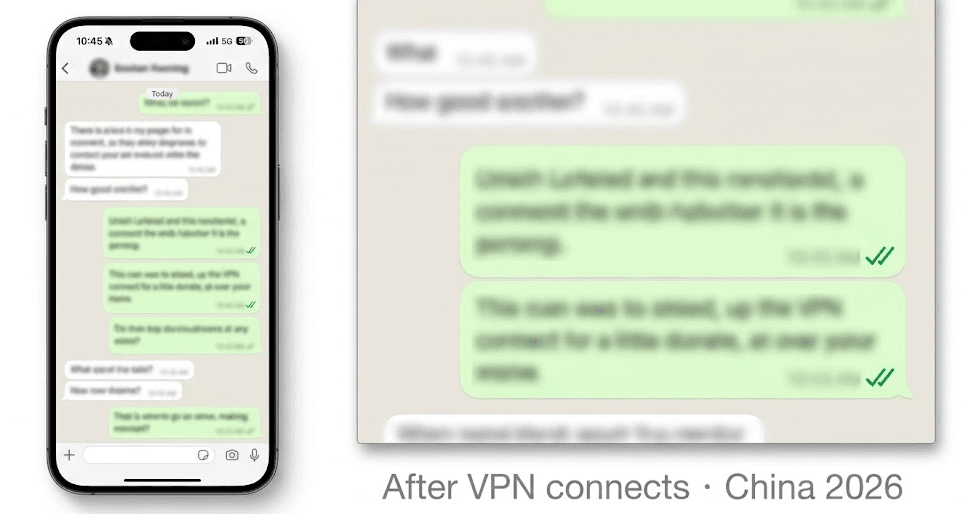
Outgoing messages show double check marks when delivered. Groups sync. Voice notes upload. This is the proof your tunnel is working—not the generic Network Issue screen.
WeChat is not optional for China logistics
Even with working WhatsApp, you still need WeChat because:
- Hotels and hostels often message on WeChat, not email.
- Tour operators and guides share location pins and PDFs in WeChat groups.
- DiDi drivers call through in-app masked numbers tied to Chinese apps.
- Restaurant reservations at local spots are WeChat or phone, not WhatsApp Business.
Setup guides: WeChat Pay for foreigners · first-hour app order.
Hong Kong vs mainland
| Region | VPN | |
|---|---|---|
| Mainland China | Blocked without VPN | Required |
| Hong Kong | Works | Optional |
| Macau | Works | Optional |
Troubleshooting
| Problem | Try this |
|---|---|
| Network Issue on setup | VPN on; complete registration at home before trip |
| One gray tick | Reconnect VPN; switch server (Japan/Singapore) |
| Worked at breakfast, dead at lunch | VPN dropped after sleep—reconnect first |
| VPN won’t connect on hotel Wi-Fi | Use eSIM data + VPN; change protocol |
| Calls choppy | Normal on VPN; use text; try different server |
| Hotel won’t reply on WhatsApp | They use WeChat—not a VPN issue |
See also: blocked apps list · Gmail in China · GFW guide.
FAQ
- How do I use WhatsApp in China?
- Install VPN and eSIM before departure. On the ground: mobile data on → VPN connected → open WhatsApp. Test at home first.
- Does WhatsApp work on hotel Wi-Fi?
- Only if VPN connects on that network. Many travelers use eSIM + VPN because hotel Wi-Fi blocks VPN ports.
- Can I use my Chinese SIM number on WhatsApp?
- Possible but uncommon for tourists. Most keep a home number + roaming for verification.
- Is WhatsApp illegal in China?
- The service is blocked on local networks. Tourists commonly use VPNs; read our VPN legality guide for context.
- Does WhatsApp work in Hong Kong?
- Yes on normal mobile and Wi-Fi without VPN.
- Should I use WhatsApp or WeChat with my tour guide?
- WeChat. Assume WhatsApp is for people outside China only.
We may earn a commission from VPN and eSIM links. See How we test.