Great Firewall · 2026
Does Gmail Work in China? (2026)
Gmail does not load on mainland mobile data or hotel Wi-Fi without a paid VPN installed before you fly. This is DNS and IP blocking of Google’s network—not a wrong password or a broken app.
Does Gmail work in China? On a normal mainland connection, no. With a stable VPN tunnel to a server outside China, yes—same inbox, same @gmail.com address. An eSIM or roaming SIM gives you data; it does not by itself unblock Google. You still need VPN on top of mobile data in almost every case.
Mainland without VPN = blocked · Mainland with VPN + data = works · Hong Kong/Macau = no VPN needed · Install and test before departure
What the Great Firewall blocks (not just Gmail)
China’s filtering targets Google’s entire ecosystem. If Gmail fails, these usually fail on the same connection too:
- mail.google.com and the Gmail iOS/Android app sync
- accounts.google.com (login and 2-step prompts)
- google.com, Google Search, Google Drive, Photos, Calendar
- Google Maps (use Amap on the ground)
- YouTube, Google Play Store (on Android), and many third-party sites that load Google APIs
Full list: China blocked apps (2026). Pay and ride apps (Alipay, DiDi) work without VPN—do not confuse the two stacks.
| Network | Gmail without VPN | Notes |
|---|---|---|
| Mainland hotel Wi-Fi | Blocked | Same filter as 5G; VPN may also struggle to connect on some hotel networks |
| Mainland 5G / China eSIM | Blocked | Data works; Google still filtered unless VPN is on |
| Home-country roaming in China | Usually blocked | Traffic still enters China’s backbone |
| Hong Kong / Macau | Works | Separate network policy |
| Mainland + paid VPN | Works | Test server in Japan, Singapore, or US West |
What failure looks like (no VPN)
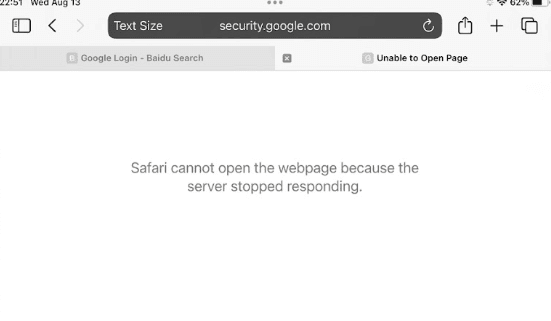
Safari or Chrome often shows “Safari cannot open the page because the server stopped responding” on mail.google.com or security.google.com. The Gmail app shows endless sync or empty inbox. Baidu may appear in your tabs because you searched “Google login”—that is a normal panic move, not a fix.
This is not fixed by switching from Wi-Fi to cellular, clearing cache, or reinstalling Gmail. The route to Google is blocked upstream.
Step-by-step: Gmail-ready setup before you fly
- Choose a paid VPN (free apps rarely reconnect after sleep in China). Install from your home App Store—do not wait until you land to download.
- Log in once at home and save credentials in the app. Enable auto-connect or a one-tap widget if offered.
- Pick a nearby server (Japan, Singapore, Hong Kong) for lower latency. Avoid overloaded free nodes.
- Connect VPN → open Gmail in browser and app. Send a test email to yourself. If that works at home, your account is fine.
- Activate a China eSIM or confirm roaming. VPN needs working data; airport captive Wi-Fi alone is unreliable. Compare eSIM options or Trip.com China eSIM.
- 2-step verification: Ensure Google can reach you via backup codes or an authenticator app—SMS to a roaming number may be slow but often still works for login challenges.
- Offline copies: Download PDFs for trains, hotels, and visa letters to Files. Screenshot QR codes for tickets that live in Gmail.
Protocol note
Many travelers use WireGuard or OpenVPN inside the VPN app. If one protocol fails on hotel Wi-Fi, switch protocol or server inside the same app before you assume Gmail is dead.
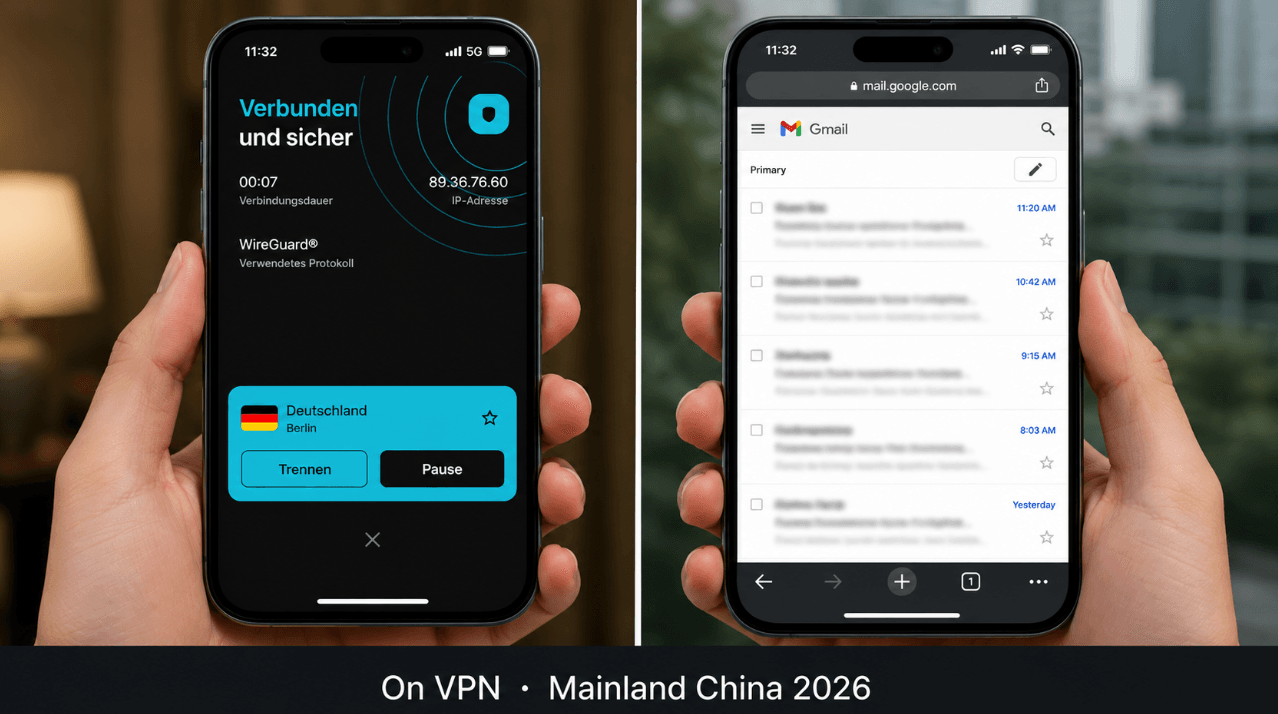
mail.google.com inbox loads (right). Always connect VPN before opening the browser tab.First hour in China: order of operations
At immigration, your phone may auto-join airport Wi-Fi. That Wi-Fi is still mainland-filtered. A practical sequence:
- Enable your eSIM line (or roaming) and confirm mobile data icon.
- Connect VPN on mobile data first—not only on airport Wi-Fi.
- Open Gmail and confirm sync. Reply to any urgent hotel or bank mail.
- Then set up Alipay and WeChat Pay (no VPN needed for those).
Full landing checklist: first-hour app setup.
Hotel Wi-Fi: why Gmail dies even with VPN
Two separate problems stack on hotel networks:
- Google is blocked on the hotel’s ISP path (VPN fixes this if the tunnel connects).
- Some hotels block VPN ports on guest Wi-Fi, so the tunnel never establishes. Fix: use 5G/eSIM + VPN, or try a different VPN protocol/server.
After your phone sleeps, VPN often disconnects. Make reconnecting VPN a habit before you open Gmail—not after you see the error screen.
Backup email plan (if VPN fails)
Do not bet the trip on Gmail alone.
- Forward critical threads to an inbox you can reach without Google (test from China if possible).
- Trip.com app notifications for hotel and train bookings—book via Trip.com and keep confirmation numbers in the app.
- WeChat for messages from Chinese hotels and guides (they rarely use email).
- Outlook / iCloud: Partial access without VPN has been reported by some travelers but is inconsistent—treat VPN as mandatory for US tech stacks.
Hong Kong, Macau, and the mainland
| Region | Gmail | VPN |
|---|---|---|
| Mainland China | Blocked without VPN | Required for Google stack |
| Hong Kong | Works on local networks | Optional |
| Macau | Works on local networks | Optional |
Flying into Hong Kong then taking the high-speed train to Shenzhen? Gmail works in HK; it stops again on mainland mobile data unless VPN is on. Plan the toggle at the border.
Troubleshooting checklist
| Symptom | Likely cause | Fix |
|---|---|---|
| Page never loads | No VPN or VPN disconnected | Reconnect VPN; use mobile data |
| VPN won’t connect on hotel Wi-Fi | Port blocking | Switch to eSIM data + VPN; change protocol |
| Login loop / 2FA fails | SMS delay | Use authenticator app; backup codes |
| Gmail worked yesterday, not today | VPN killed after sleep | Reconnect before opening app |
| App empty, browser works | App cache | Force-quit Gmail; reopen with VPN on |
VPN legality context for tourists: Is VPN illegal in China?
FAQ
- Does the Gmail app work in China?
- Only through VPN. The app hits the same blocked Google endpoints as the website.
- Does Gmail work with a China eSIM alone?
- No. eSIM gives you data; Google is still filtered. You need VPN on top of the data connection.
- Can I use Gmail on hotel Wi-Fi?
- Only with a working VPN tunnel. Many travelers prefer eSIM + VPN over hotel Wi-Fi for Google.
- Will I get in trouble for using Gmail with a VPN?
- Tourists commonly do; read our VPN legality guide for context. Install the VPN before entry and use reputable paid apps.
- Does Gmail work in Hong Kong?
- Yes on normal HK networks without VPN.
- Can I download a VPN inside China?
- Unreliable. App Store access to VPN apps may be restricted. Install and subscribe at home.
We may earn a commission from VPN and eSIM links. See Digital Survival Kit and How we test.