Digital Survival Kit · Dining
How to Order Food in China: QR Menus & Meituan Delivery (2026)
In tier-1 cities you scan a table QR, pay in-app, and only then does the kitchen print a ticket. Miss that sequence and you wait 15 minutes for food that was never fired. This guide covers dine-in QR flow, failure fixes, and hotel-safe Meituan delivery.
Bottom line: Screenshot the menu the second you sit down, pay before you expect the kitchen to move, and disable your VPN at checkout. When the restaurant mini-program fails, Meituan inside Alipay is the most reliable backup for foreigners with linked Visa or Mastercard.
The reality of digital dining in 2026
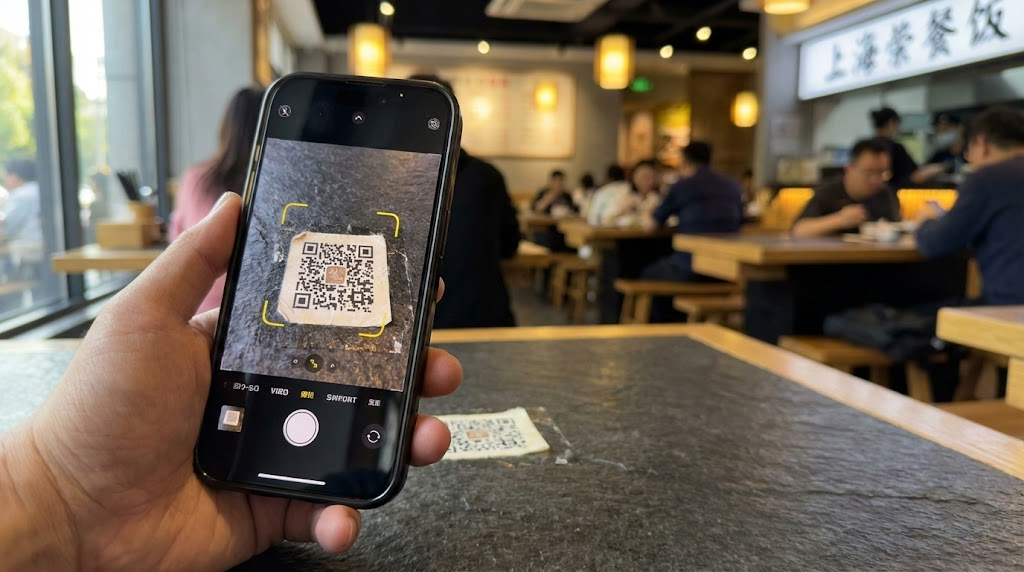
Most mid-range restaurants in Shanghai, Beijing, and other tier-1 hubs require a table QR scan before you order. Paper menus are rare. Staff prioritize kitchen tickets over taking verbal orders—especially at lunch rush.
Local travelers often screenshot menus to translate categories immediately upon sitting to save time during the lunch rush.
Payment stack: set up How to Use Alipay in China (2026) before you land. Backup: WeChat Pay for foreigners. Hub: Alipay & WeChat Pay setup.
3 steps to actually get your food
Follow this sequence so your order reaches the kitchen instead of dying in a ghost cart.
- Launch the Alipay scanner: Open Alipay → Scan. WeChat works too, but Alipay’s international card path is often smoother for tourists.
- Screenshot for translation: Most mini-programs lack English. Screenshot categories and search for 招牌 (signature dishes) and 主食 (staples) in a translation app.
- Pay to submit: In roughly 90% of casual restaurants, the kitchen does not start until payment shows 支付成功. Screenshot success and show staff if the ticket lags. Keep a second payment method—international cards can hit per-transaction limits.
Troubleshooting: why QR orders fail
Work through this table before waving down staff.
| Issue | Cause | Action | Quick tip |
|---|---|---|---|
| Payment fails | VPN or non-local routing | Disable Surfshark and refresh | Turn VPN off before pay |
| Phone number wall | Mandatory membership | Tap guest mode or show screen to waiter | Say: Wǒ méiyǒu shǒujī hào |
| Menu won’t load | Dead zone / weak signal | Use China eSIM; move from interior walls | 5G is standard in cities |
| Location prompt | Geofencing | Tap Allow immediately | Enable location in OS settings |
VPN vs data: VPN vs eSIM guide. Payment declines: Alipay troubleshooting.
Meituan delivery: step-by-step via Alipay
When dine-in QR systems break, Meituan Takeaway inside Alipay gives tracking, hotel lobby drops, and international card settlement.
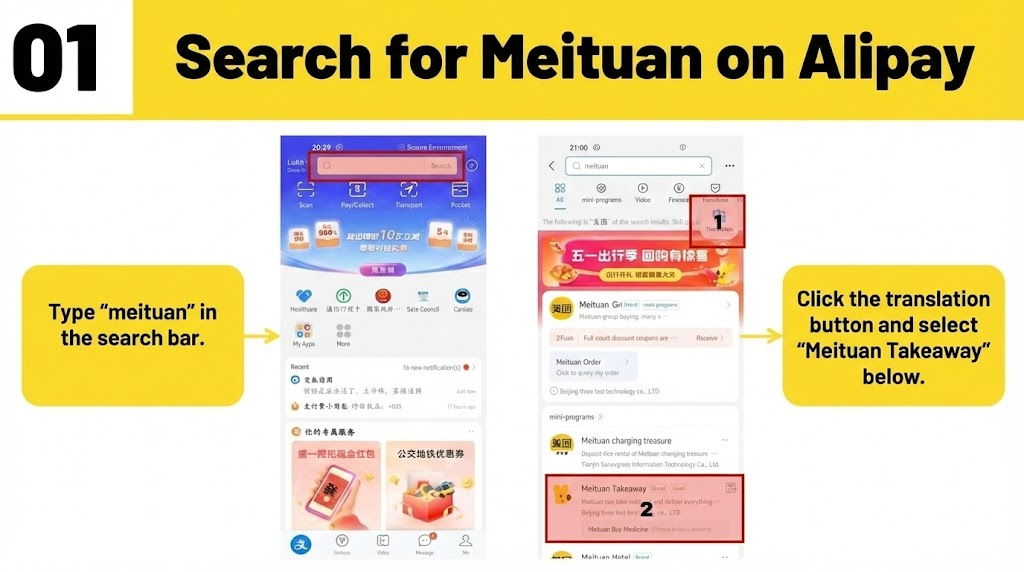
Step 1: Locate Meituan on Alipay
Type meituan in the Alipay search bar and open Meituan Takeaway (美团外卖).
Action: Click the translation button in the app to assist with navigation.
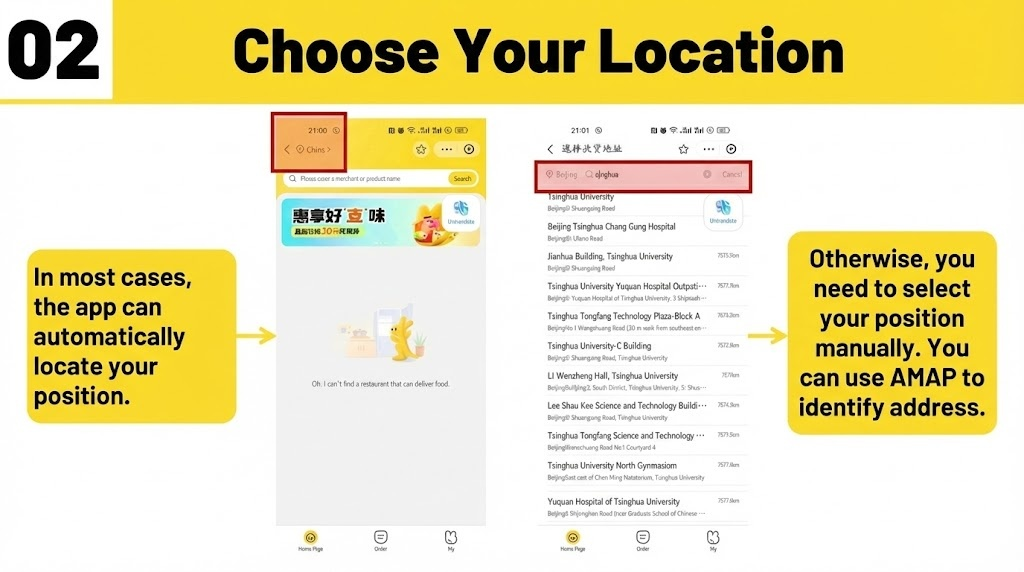
Step 2: Choose your location
The app usually auto-locates you. Broad GPS (“China >”) returns zero restaurants.
Tip: If it fails, search for your hotel address in Chinese manually using AMAP for accuracy.
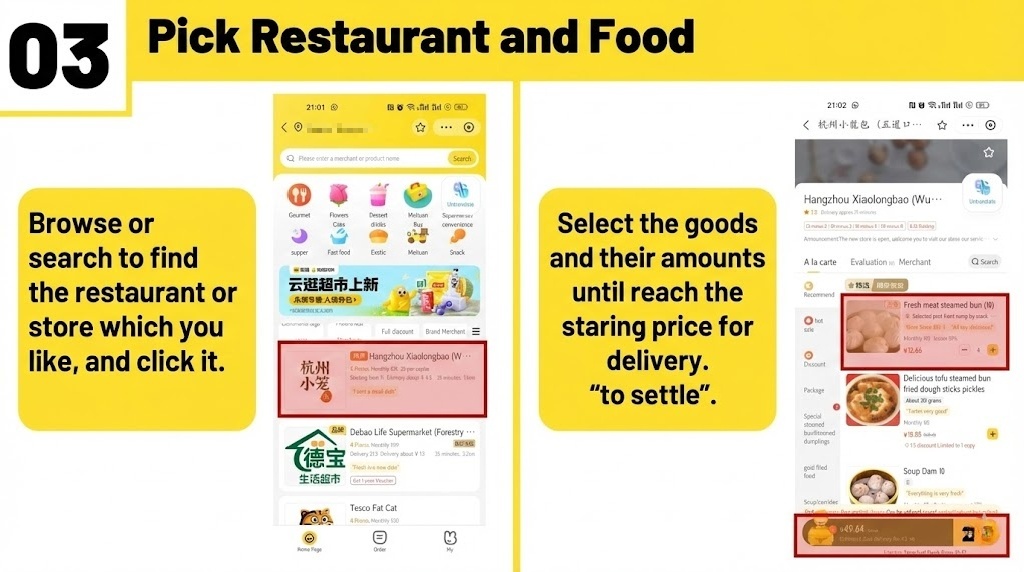
Step 3: Pick restaurant and food
Search 火锅 (hotpot) or 奶茶 (milk tea). Add items until you hit the minimum delivery fee, then tap to settle.
Tip: Check that the merchant has at least a 4-star rating and verify the total price before final payment.
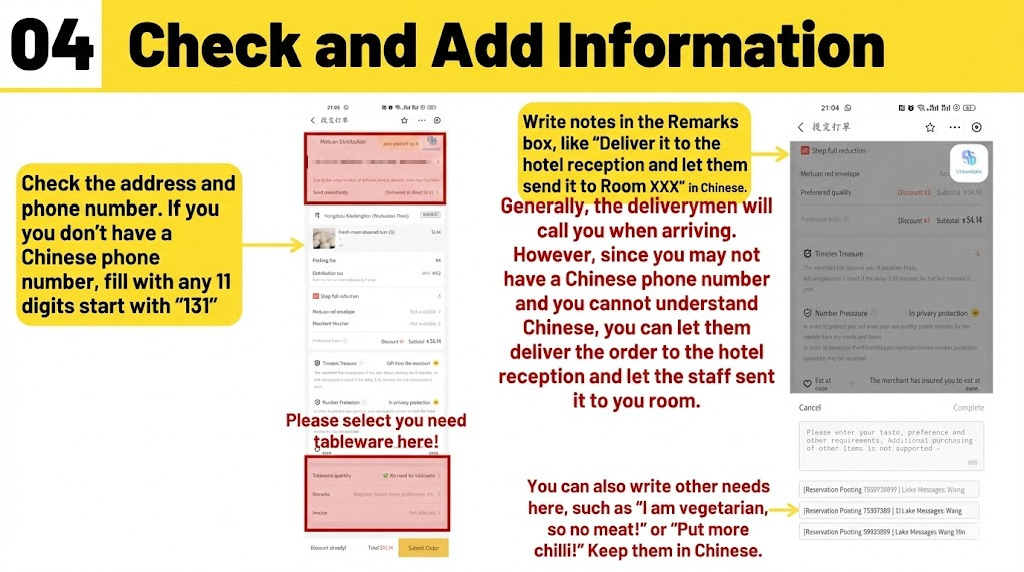
Step 4: Check and add information
Verify the Chinese address pin. No Chinese SIM? Use an 11-digit placeholder starting with 131 in the phone field.
Select tableware if prompted—many hotels need disposable utensils flagged explicitly.
Action: Write notes like “Deliver to hotel reception” (请送到酒店前台) in the Remarks box in Chinese to avoid delivery misunderstandings.
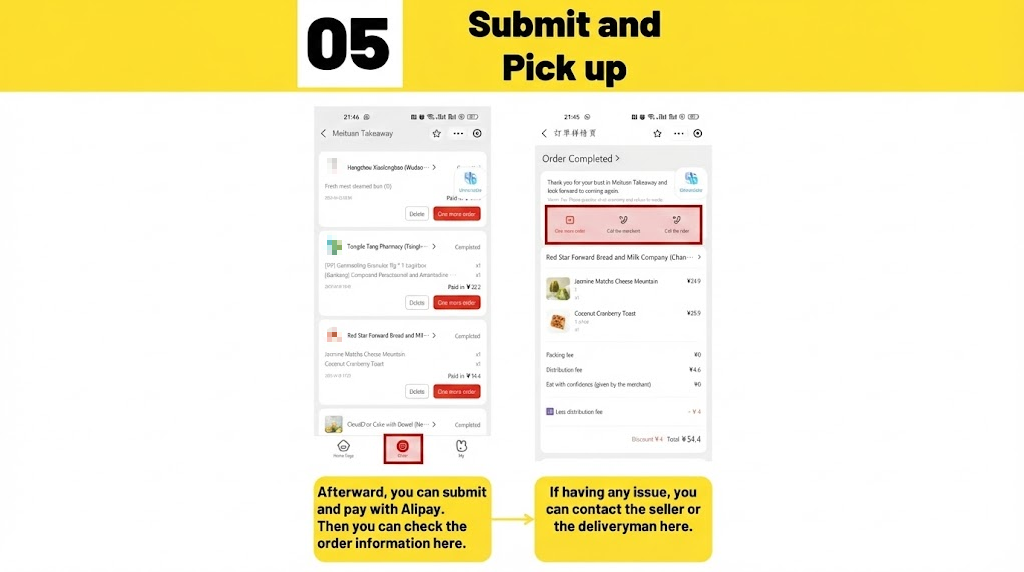
Step 5: Submit and track
Pay with Alipay. Open the Order tab to see status, call merchant/rider buttons, and reorder shortcuts.
Tip: Watch the rider zoom on the map and use in-app chat for extra items.
2026 essentials summary
| Service | Status | Recommendation |
|---|---|---|
| Payment | High support | Link cards to Alipay or WeChat Pay |
| VPN | Restricted at paywall | Install Surfshark; disable for local QR checkout |
| eSIM | 5G standard | Activate China eSIM before arrival |
Formal dining note
High-end restaurants often skip QR ordering. Read China corporate dining etiquette 2026 before business banquets.
Fast-action checklist
- Download a translation app with screen overlay.
- Install and test your China eSIM.
- Verify Alipay setup.
- Scan table QR and screenshot menu for translation.
- Disable VPN → pay → confirm 支付成功 before waiting for food.
FAQ
Why does my QR order not reach the kitchen?
Most casual restaurants require digital pre-payment before cooking. Confirm 支付成功 in Alipay or WeChat; show staff the success screen if the ticket never prints.
Can I pay with international cards at small vendors?
Chains usually accept them through Alipay/WeChat. Street stalls may refuse—top up Alipay or keep RMB cash.
Why does the app ask for location permissions?
Mini-programs geofence to your table. Denying location can grey out Order—tap Allow while using the app.
Can I use foreign SIMs in remote areas?
Cities have 5G; remote zones have dead zones. A China eSIM is the reliable default for menu loads and Meituan maps.
Can I order for multiple tables?
Generally no—each QR ties to one table session. Separate tables scan and pay separately.
What if the QR fails at peak hours?
Disable VPN first. If it still fails, show the error to staff—they can often run a manual staff card entry.
How do I handle a delivery rider calling me?
Use in-app chat with built-in translation. Default line: 请送到酒店前台 (leave at hotel reception).
How long does Meituan delivery take?
Most city orders arrive in 30–45 minutes. Peak lunch or heavy rain can stretch to 60 minutes.