12306 deep guide · 2026
China Train App for Foreigners: 12306 Step-by-Step (2026)
Most foreigners should book China trains on Trip.com first—English checkout, foreign cards, one place for hotels and trains. The 12306 section below is for travelers who want the official app (no OTA service fee) and can finish passport verification. Same seats on the network; different hassle level.
China train app for foreigners searches usually mean 12306 or Trip.com. They are not the same app: 12306 is China Railway’s official channel; Trip.com is an English-friendly agency on the same inventory. For a typical first trip, start with Trip.com—then use the six-step 12306 walkthrough only if you still want the official path.
Default (most tourists): book on Trip.com · Advanced (optional): 12306 app below if you want zero service fee and can pass verification · Same passport at the gate either way
Book on Trip.com first (recommended)
Start China Travel uses Trip.com as the main train booking path on this site—especially for your first China itinerary.
- English search, seat maps, changes, and support chat.
- Foreign credit/debit cards without setting up Alipay or WeChat Pay first.
- One account for trains, hotels, and flights on the same trip.
- Faster than debugging 12306 menus under time pressure.
Bookmark the partner trains page after you open it once—repeat bookings from that tab, not by re-searching in Google (avoids phishing copies).
Step-by-step with screenshots: how to book China trains on Trip.com. Routes and seat classes: high-speed rail for foreigners.
12306 vs Trip.com: which path is yours?
| Trip.com (default) | 12306 app (advanced) | |
|---|---|---|
| Our recommendation | First China trip | Repeat visitors, fee-focused, Alipay-ready |
| Guide on this site | Trip.com booking guide | Six steps below |
| Language | English | Chinese-first UI |
| Payment | International cards common | Alipay / WeChat / UnionPay typical |
| Service fee | May apply at checkout | None on direct railway fare |
| When it wins | Short trip, need support, 12306 signup failed | You want the lowest fare and accept setup time |
Before the 12306 steps: timing and tickets
Skip this block if you are booking on Trip.com only. Come back here if you switch to 12306 mid-trip or on a return visit.
- Install and verify early. Do Steps 1–3 at least a few days before your first train—not at the station. Verification is often instant; some accounts take up to 48 hours.
- Tickets release 15 days out (China calendar). Hot G trains (Beijing–Shanghai, Beijing–Xi’an) sell out quickly: Chunyun guide.
- Match stations exactly. Beijing South vs Beijing West matters—see the HSR station table in our high-speed rail guide.
- Same passport everywhere. Booking name, verification, and boarding must match the physical passport you carry.
Advanced: official 12306 app walkthrough (six steps). Same trains as Trip.com; you trade English convenience for no OTA service fee.
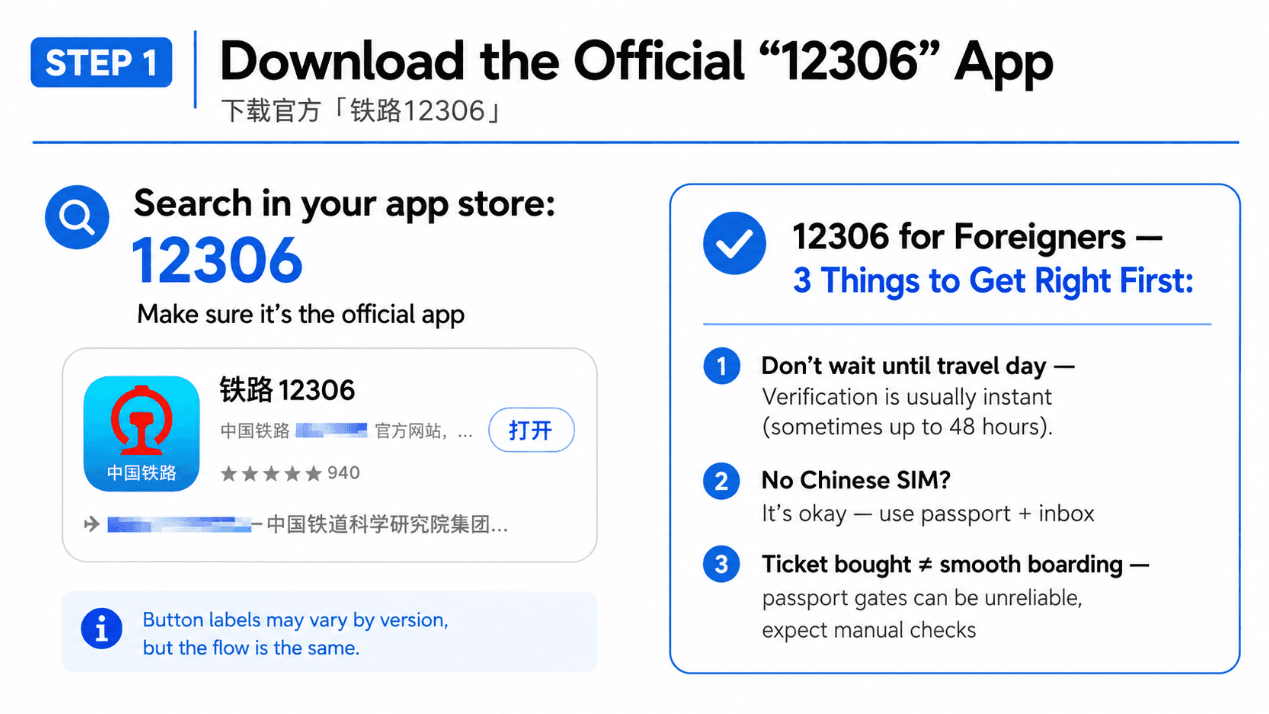
Download the official 铁路12306 app
In your phone’s app store, search 12306 and install the listing published by China Railway (中国铁路), developer tied to China Academy of Railway Sciences—not unrelated “train helper” apps.
- Icon: blue background with the red China Railway logo and 铁路12306 name.
- Button may show Open (打开) if already installed—flow is the same.
- UI varies by app version; follow in-app prompts if menus differ slightly from the screenshots.
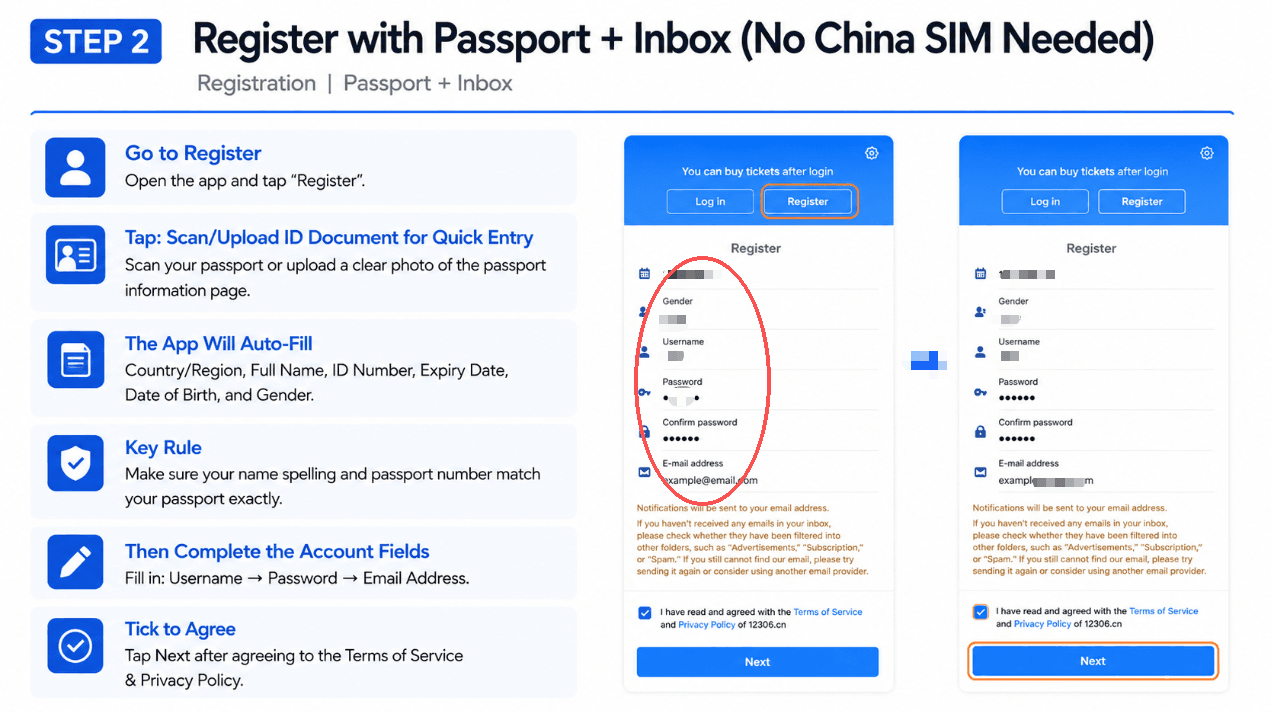
Register with passport + email (no China SIM needed)
Open the app and tap Register (注册). Foreign travelers should use passport scan/upload rather than typing Chinese ID fields by hand.
- Tap Register on the login screen.
- Choose Scan/Upload ID Document (扫描/上传证件) and use a clear photo of your passport bio page.
- Let the app auto-fill country, name, passport number, expiry, date of birth, gender—then manually fix any OCR mistakes.
- Critical: spelling and passport number must match the document exactly (same rule as flights).
- Complete username, password, and email. Notifications go to this inbox—check spam if you do not see verification mail.
- Tick agree to Terms of Service & Privacy Policy, then tap Next.
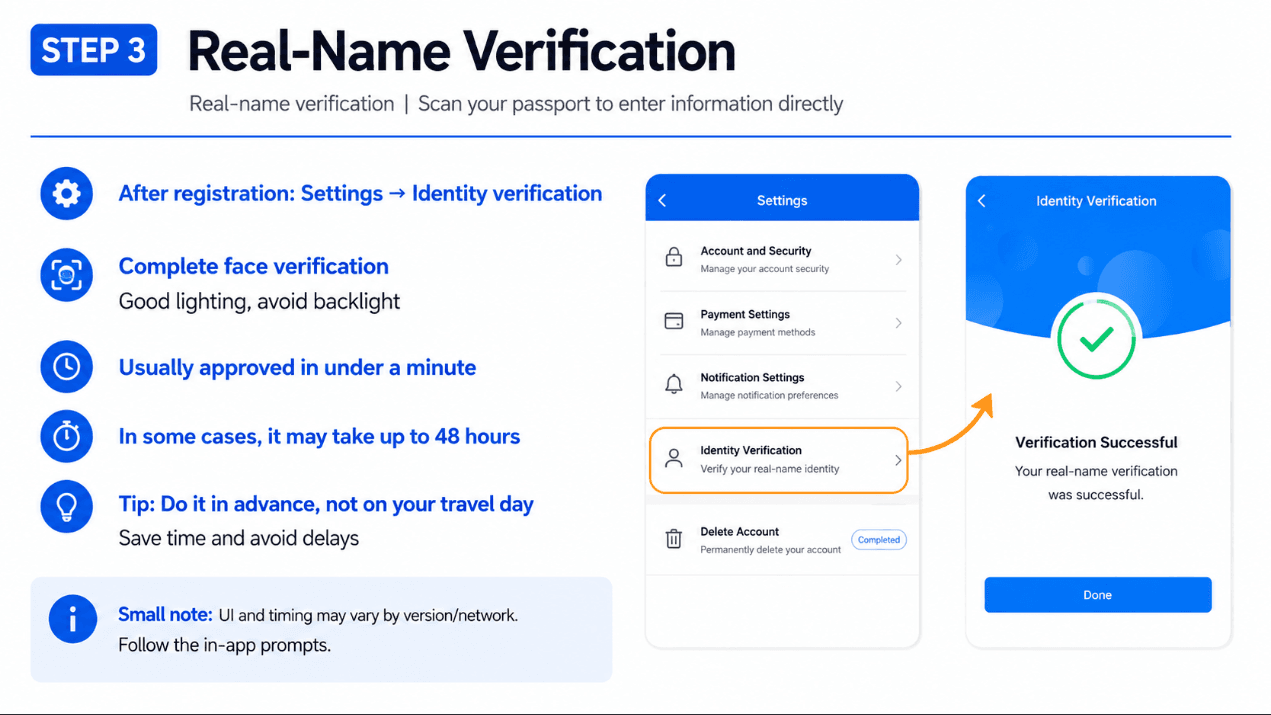
Real-name verification (face + passport)
After registration, complete identity verification before you try to buy tickets.
- Go to Settings (设置) → Identity Verification (身份核验 / 身份验证).
- Follow prompts to scan passport and complete face verification—good lighting, no heavy backlight.
- Wait for Verification Successful (核验成功). Many accounts approve in under a minute; allow up to 48 hours in edge cases.
Do not skip this on travel day
Unverified accounts cannot reliably issue e-tickets tied to your passport. Finish Step 3 while you still have Wi-Fi at the hotel, not in the taxi to the station.
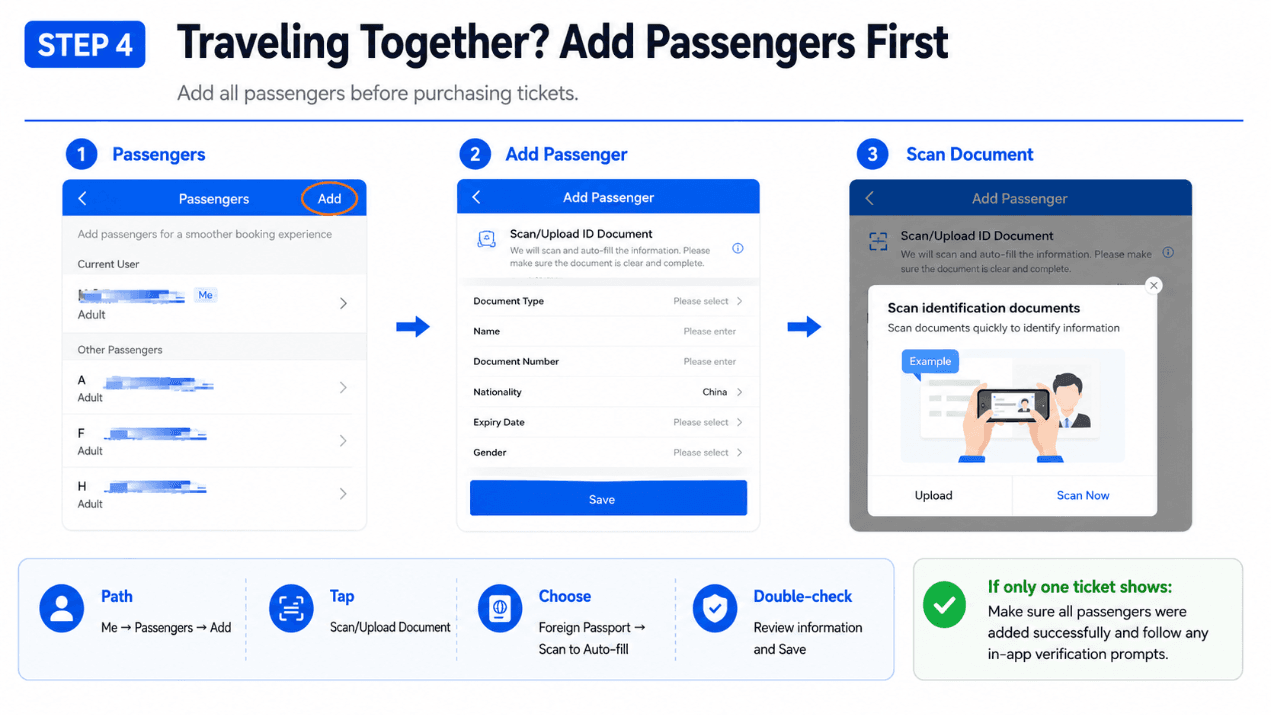
Traveling together? Add passengers first
Booking for family or friends? Add every traveler before you search trains—otherwise checkout may only show one seat.
Path: Me (我的) → Passengers (乘车人) → Add (添加).
- Tap Scan/Upload ID Document for each person.
- Select document type Foreign Passport (护照) and scan or upload.
- Review auto-filled fields, tap Save (保存).
- Repeat for each adult/child. Child fare rules appear at payment—confirm on screen.
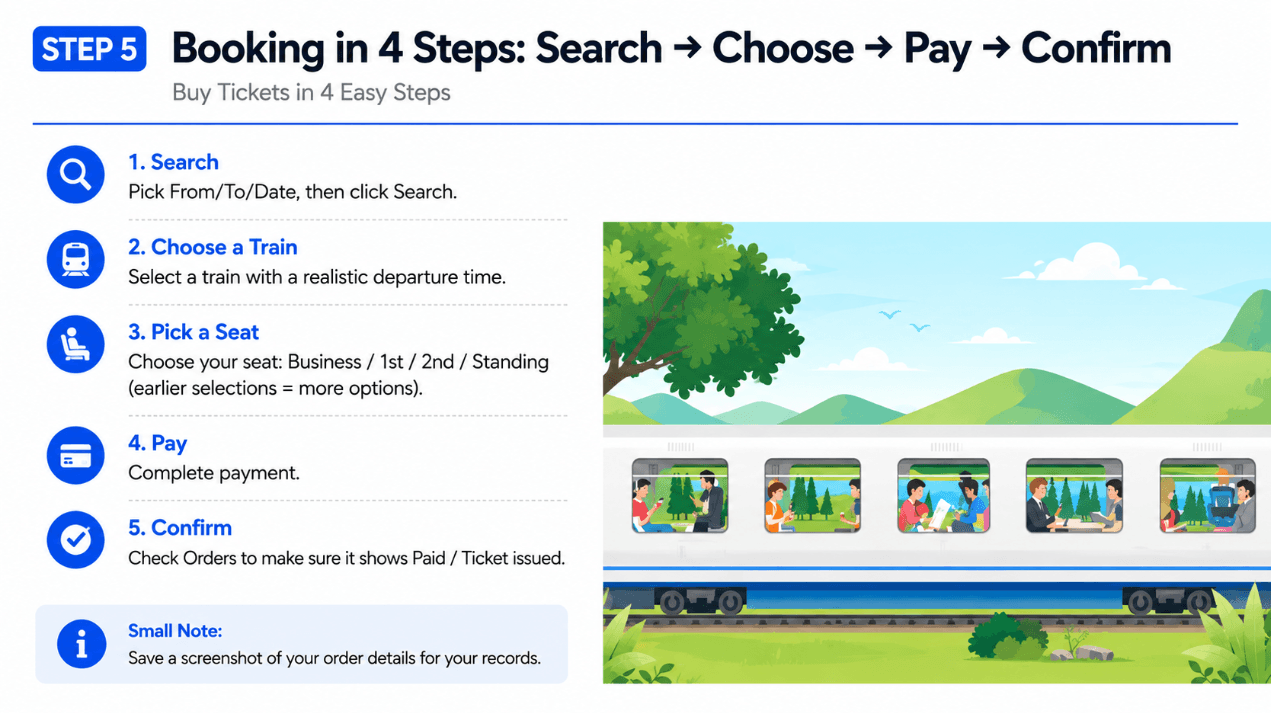
Book tickets: search → choose → pay → confirm
Once your account and passengers are verified, buying follows four moves:
- Search: From / To stations (use full names: 北京南, 上海虹桥), date, then Search.
- Choose train: Pick a train with realistic departure time and duration shown on the list.
- Seat class: Second class (二等座) is the tourist default; first/business cost more; standing tickets only if you understand the label.
- Pay: Complete payment in the app (Alipay/WeChat/bank paths depend on your setup).
- Confirm: Open Orders and verify status shows paid / ticket issued. Screenshot the order detail screen.
15-day release rush
On popular routes, refresh at release time or book the moment your travel window opens. If payment fails, inventory vanishes, or you are out of time to finish setup, book the same train on Trip.com—that is the practical fallback we use on this site.
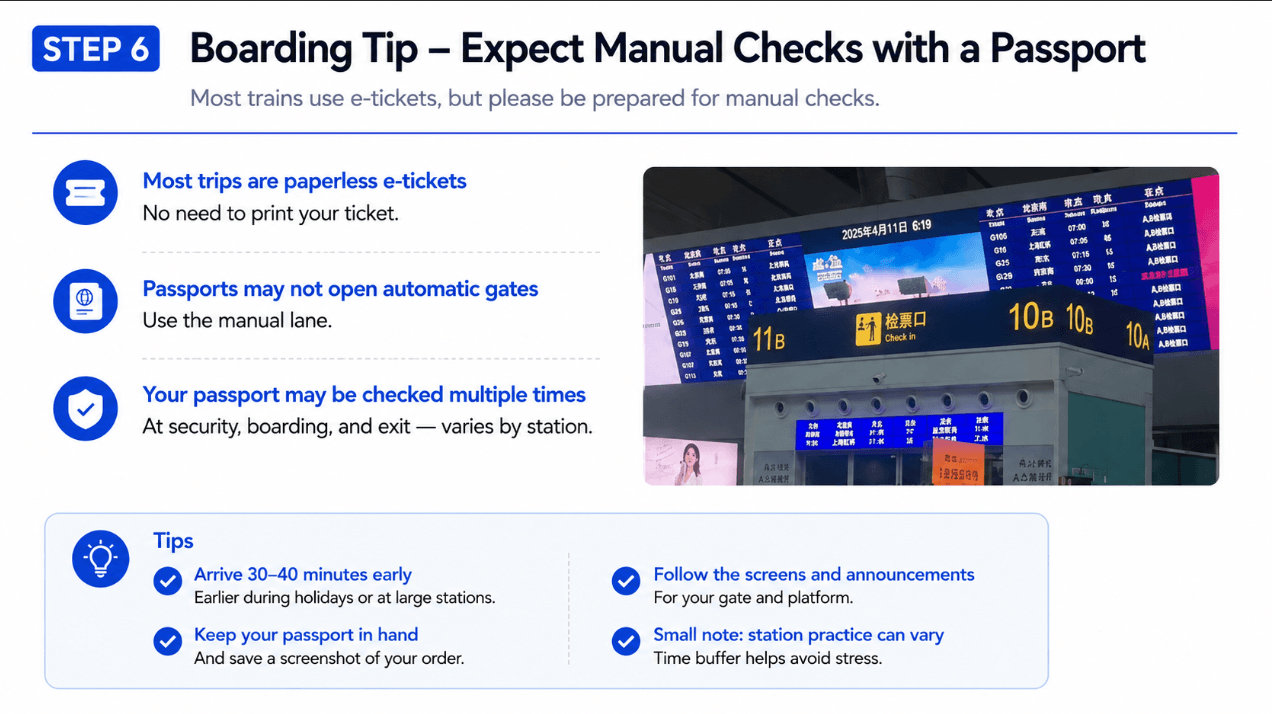
Boarding: e-ticket + manual passport checks
Most high-speed trips are paperless e-tickets tied to your passport. That does not always mean automatic gates work for foreign documents.
- No print required for most G/D trains—but carry your passport anyway.
- Passport may not open automatic gates. Use the manual check-in lane (人工检票) and show passport + 12306 order screenshot.
- Multiple checks are normal: security, ticket check, and sometimes exit controls—varies by station.
- Arrive 30–40 minutes early (more on holidays and at mega-hubs like Beijing South / Shanghai Hongqiao).
- Watch departure boards for 检票口 (check-in gate) and platform changes.
Still stuck? Use Trip.com (same train, less setup)
You do not have to finish all six 12306 steps. Trip.com is the default on Start China Travel because most tourists optimize for time, not for saving a small service fee.
- 12306 registration or face verification failed.
- You need English changes, refunds, or order history.
- You are paying with a foreign card and Alipay is not set up yet.
- You want trains + hotels in one checkout flow.
- Golden Week / Chunyun: queue on Trip.com early instead of fighting 12306 release UI.
Same seat inventory, different wrapper: Trip.com may add a small fee at checkout; 12306 sells the railway fare direct. For most first-time visitors, the fee is worth avoiding a failed setup the night before departure.
FAQ
- Should I use Trip.com or 12306 for my first China train?
- Trip.com for most first trips: English UI, foreign cards, and support. Use 12306 only if you are comfortable with Chinese apps, already use Alipay, or want to avoid OTA fees and have time to verify before ticket release day.
- Will booking on 12306 hurt my Trip.com booking?
- No. They are separate accounts. Pick one channel per ticket so you do not double-book the same seat.
- Can foreigners use the 12306 app without a Chinese phone number?
- Many travelers register with passport + email as shown in Step 2. Policies can change by app version—if SMS login is mandatory on your build, use Trip.com or the 12306 mini-program inside verified Alipay.
- How long does 12306 identity verification take?
- Often under a minute; allow up to 48 hours in rare cases. Complete Step 3 before ticket release day.
- Why did the passport gate reject me?
- Foreign passports frequently need manual lanes even when the ticket is valid. Show passport + order screenshot to station staff.
- Do I need to print 12306 tickets?
- Usually no on high-speed e-tickets. Printing does not fix a name mismatch—fix data in Passengers and rebook if needed.
- What is 12306.cn.en?
- English website mirror for the same railway system. This guide focuses on the mobile app flow with screenshots above.
- Is 12306 the same as Trip.com?
- No. 12306 is official China Railway inventory. Trip.com is an OTA reseller with English support.
- Can I book on Klook?
- Use Klook for attraction tickets and tours, not as your main train app. See Klook vs Trip.com.
Related: High-speed rail routes · Trip.com train booking · Prepare for China · Metro to the station
Some links on this page are commercial partner links to Trip.com. Full policy: Affiliate disclosure.