WeChat Pay for Foreigners 2026: The Ultimate Step-by-Step Setup Guide
Mastering WeChat Pay for foreigners is the single most critical step for a successful trip to China. You standing at a busy dumpling shop in Shanghai; you try to hand the cashier cash, but they point to a QR code and shake their head. Without digital payments, everyday tasks become immediate obstacles.
While 2026 policies have streamlined the process, the system remains strict. This guide cuts through the confusion, explaining exactly how to bind your international card and pass identity verification so you aren’t left stranded.
- Planning a wider trip? Check our How to Prepare for China in 2026: A Step-by-Step Timeline for Beginners to ensure you haven’t missed other logistics.
2026 Policy Note: Policy details may vary by region. While these steps work for major gateways like Beijing, smaller regions may differ. Always confirm with your bank before travel.
I. Preparation: What You Need
We strongly recommend setting this up at least 3 days before your flight. The verification process requires stable internet and SMS access—two things that are hard to manage when you first land.
Your Setup Checklist:
- The App: Latest version of WeChat.
- Identity Document: A valid Passport is standard.
- Visa-Free Travelers: If you are entering under the China 240-Hour Visa-Free Transit Policy, ensure your passport validity meets the entry requirements.
- International Bank Card: Visa, Mastercard, JCB, Discover, or Diners Club.
- Critical Check: Confirm with your card issuer that your card is authorized for China-based digital transactions.
- Phone Number: Your overseas mobile number works fine, provided it can receive international SMS.
- Digital Essentials: Before starting, review our Ultimate China Travel Packing List 2026 to ensure you have the right cables and power banks to keep your phone alive for payments.
Connectivity Essentials: You cannot generate payment QR codes without an active internet connection, and public Wi-Fi is notoriously unreliable. We strongly recommend getting a China eSIM Data Plan (works instantly upon landing). Also, to access your Gmail or Instagram for verification codes, you will need a reliable VPN like Surfshark.
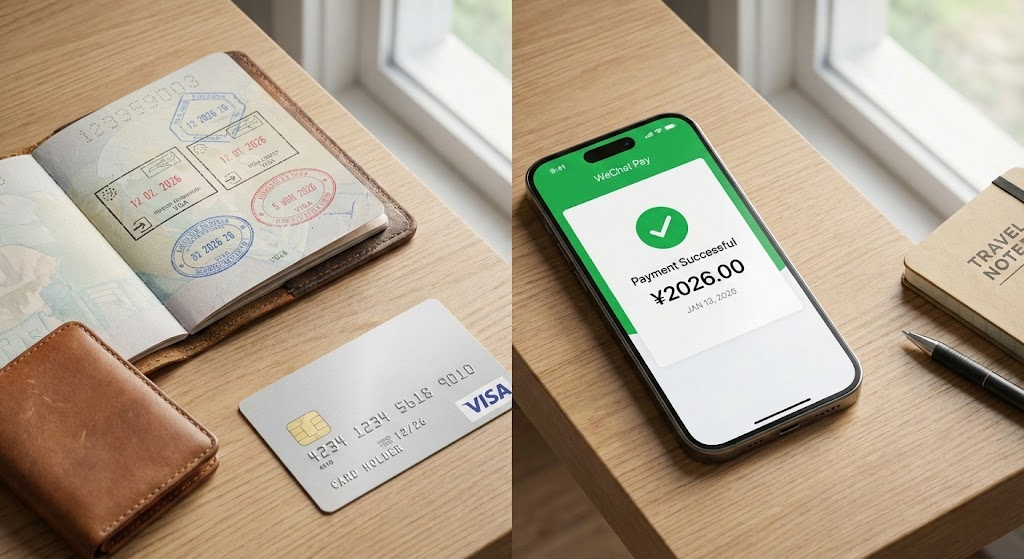
II. Setting Up WeChat Pay for Foreigners: 3 Steps
We frequently see travelers get stuck because they approach this like a standard app installation. It is a financial security procedure. Follow these specific steps to clear the bank checks.
Get your valid identity documents by your hand (Choose any of the following)
- Passport (the page with basic information and the entry stamp page arerequired).
- Mainland Travel Permit for Hong Kong and Macao Residents (Home ReturnPermit).
- Mainland Travel Permit for Taiwan Residents (Taiwan Compatriot Permit).
- Foreigner’s Permanent Residence ldentity Card,etc.
Choose one international credit card(prefer credit card instead of debitcard) :
Bank cards of mainstream international card organizations such asVisa, Mastercard, JCB, Discover, and Diners Club are supported.
Mobile Phone Number for Receiving SMS:
Overseas mobile phonenumbers are supported, and a Chinese mainland number is not reguired.
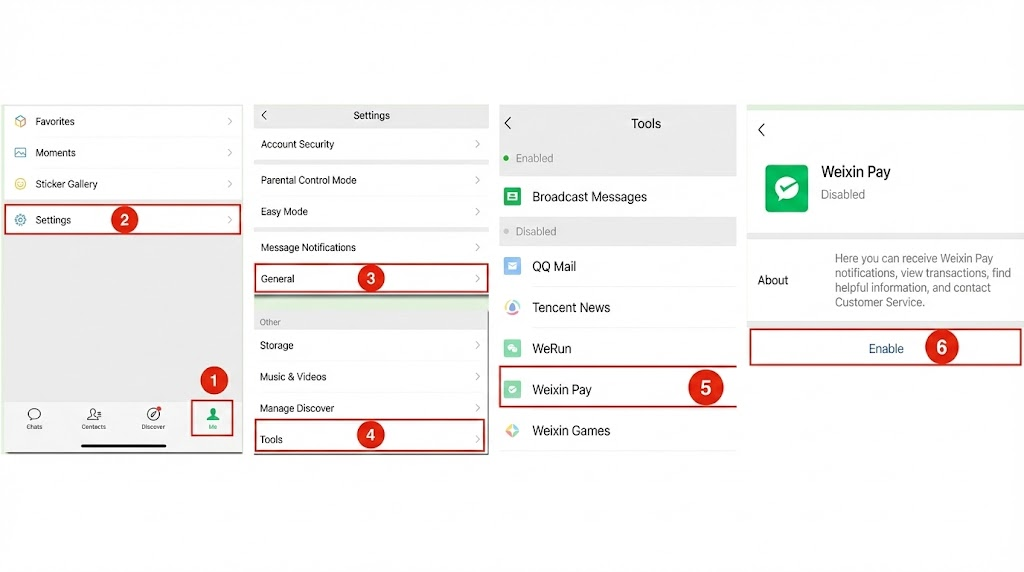
1. Activating the Wallet Interface
If you downloaded the international version of WeChat, the “Services” or “Wallet” tab might be hidden.
- Navigate to Me → Settings → General.
- Tap Tools (sometimes labeled “Auxiliary Functions”).
- Select Weixin Pay and tap Enable.
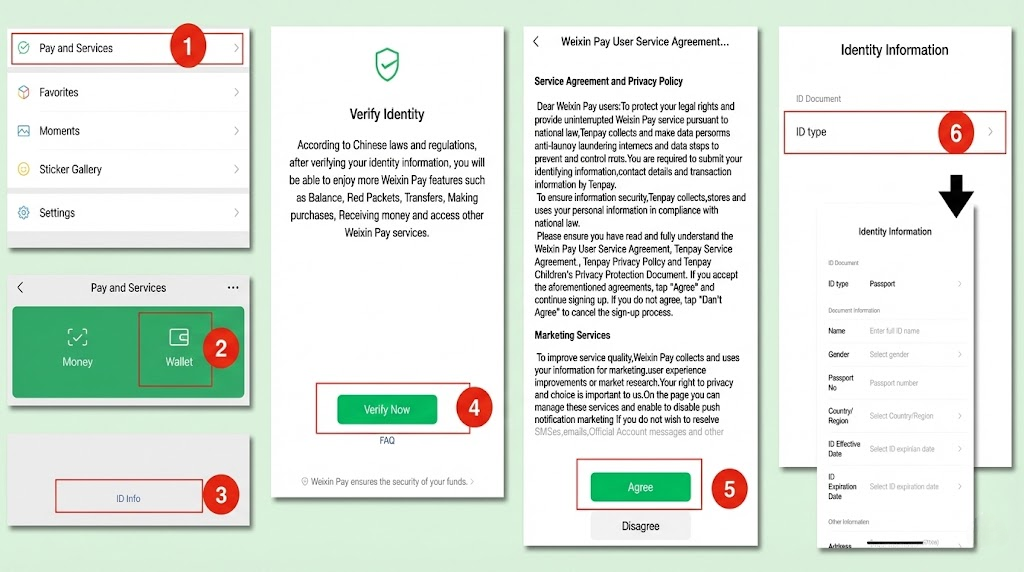
2. Passing the Real-Name Identity Check
This is the hurdle where most WeChat Pay for foreigners setups fail.
- Enter the Real – Name Authentication Page.
Click “Me” in the lower right corner →”Services” (or”Wallet) →”Wallet”→”ID Info”→ “Verify Now” →Read the Service Agreement and click “Agree” →Follow the guide to fill in cardholder information
- Fill in Personal Information.
Fill in information such as name, gender,type and number of thecertificate,expiration date,occupation,and address as prompted.
If the system requires additional information, upload a photo of thecertificate (such as the passport page and the entry stamp page).
- Bind a Bank Card (Optional but Recommended).
Some users need to bind a bank card as an auxiliary authentication. You can choose an international credit card and fill in the card number,expiration date, CW code, and billing address.
3. Binding Your International Card
Once your identity is verified, you connect the funding source.
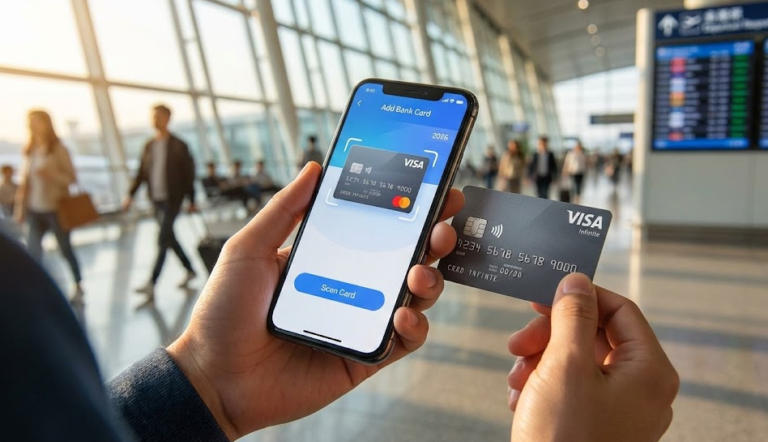
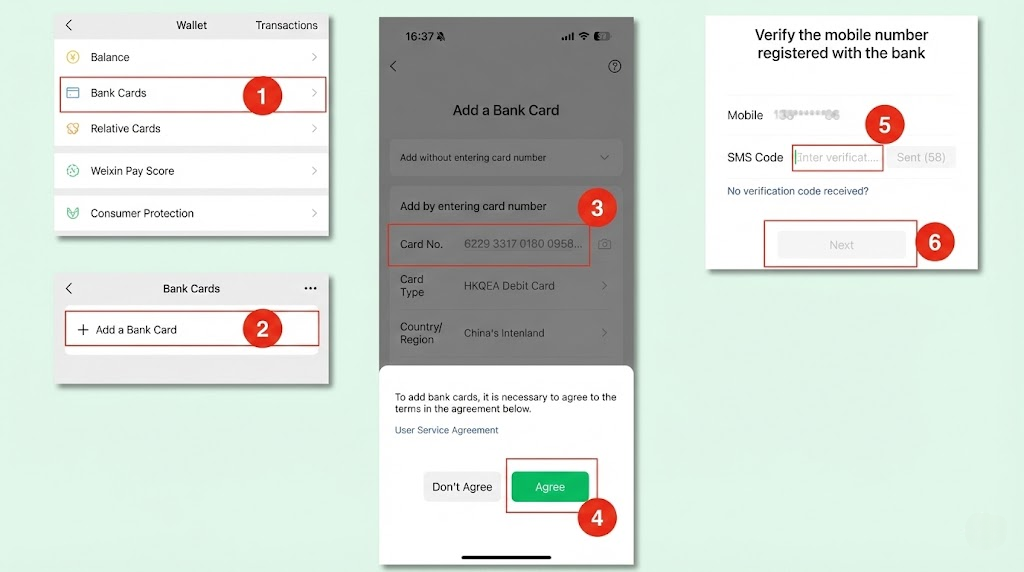
- In Wallet, tap Bank Cards → Add Bank Card.
- Enter your card details and the SMS code sent to your mobile.
- 3D Secure Warning: Be prepared for a “Verified by Visa” or Mastercard OTP prompt.
- Set Password: Create a 6-digit PIN. You will need to enter this for almost every active scan.
III. Active vs. Passive Scanning
Once you are live, you need to know which payment flow to use. Mixing these up is a common rookie mistake.
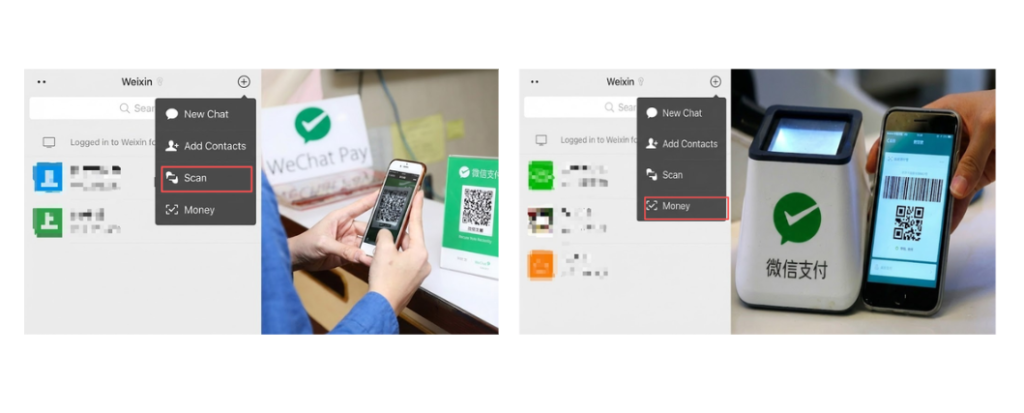
Active Scan (You Scan Them)
- Where: Street food vendors, small cafes, taxi drivers.
- How: Tap the + in the top right → Scan. Point at their printed QR code. Enter the RMB amount yourself and type your PIN.
Passive Scan (They Scan You)
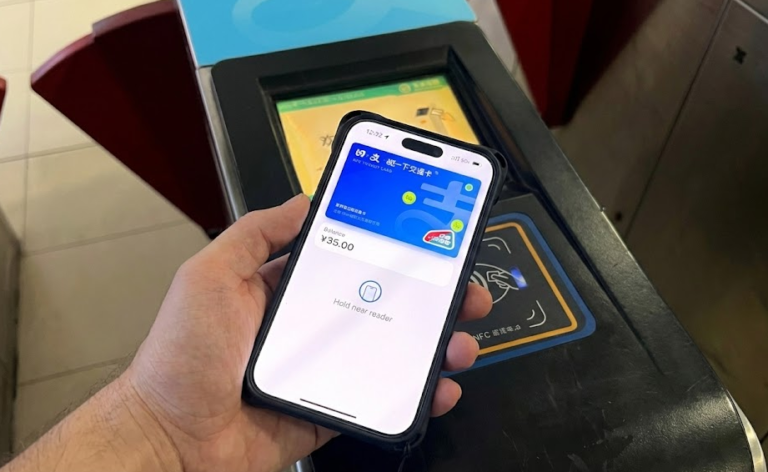
- Where: Supermarkets (Walmart/Aldi), convenience stores (FamilyMart), Subway turnstiles.
- How: Tap Me → Services → Money. Show the generated barcode/QR code to the cashier.
IV. WeChat Pay for Foreigners: Limits & Fees 2026
Using foreign mobile payment in China comes with specific boundaries. Unlike local users, international cardholders face transaction caps.
Transaction Limits
WeChat enforces these strictly for foreign cards:
- Per Transaction: 6,000 RMB (approx. $830 USD)
- Monthly Limit: 50,000 RMB
- Yearly Limit: 60,000 RMB
Fee Structure & Avoidance
Small purchases are free, but larger expenses incur a surcharge.
| Transaction Amount | Fee | Who Pays? | Insider Tip |
| ≤ 200 RMB | 0% | Free | Ideal for coffee, taxis, and snacks. |
| > 200 RMB | 3% | User | Ask hotels to split bills into 200 RMB chunks. |
Real-World Scenario: If your hotel bill is 400 RMB, paying it in one go costs you 12 RMB in fees. Most receptionists will let you scan twice for 200 RMB each to save the fee.
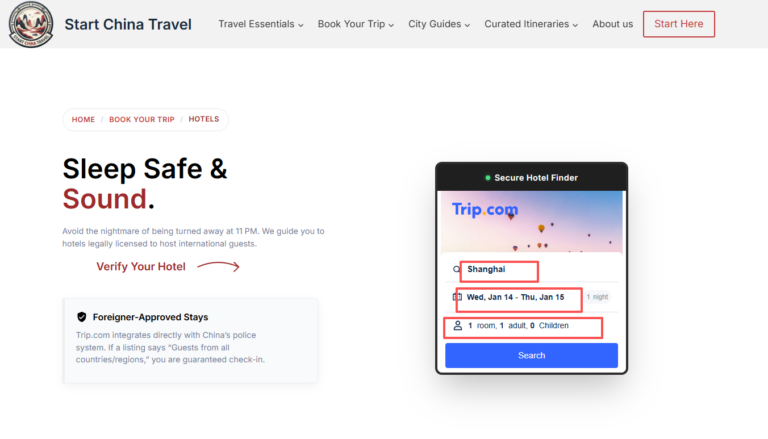
- Looking for accommodation? Read our 7 Essential Steps to Booking Foreigner Friendly Hotels in China to find places that accept digital deposits.
Once your payment is set up, ensure the rest of your logistics are locked in:
Flights: Check current prices for Flights to China.
V. Troubleshooting: Why Your Payment Might Fail
Travelers often discover their first payment fails. Here is how to fix common issues with WeChat Pay for foreigners.
1. Sudden Account Locks
If you make five transactions rapidly in a new country, WeChat’s AI often flags it as fraud.
- The Fix: Don’t panic. Follow the prompt to upload a photo of your card and passport. It usually unlocks within 2-4 hours.
2. VPN Interference
WeChat detects inconsistent IP locations (e.g., GPS says Shanghai, VPN says Los Angeles), which can block payments.
- The Fix: Briefly toggle off your VPN, make the payment, and turn it back on.
3. Internet Connectivity Issues
You cannot generate a payment code offline. Public Wi-Fi is often too slow.
- The Fix: Ensure your phone has data.
Conclusion
Setting up WeChat Pay for foreigners is your digital passport to China. While the identity verification feels rigorous, the ability to hail rides and order food with a single scan is worth the initial hassle.
Your Action Plan:
- Set up WeChat Pay (Do this 3 days before travel).
- Book your Inter-city Travel:How to Book Trains in China on Trip.com: The 2026 Insider Guide
- Secure Accommodation: [Find Hotels on Trip.com]
Final Reminder: Always carry a small amount of cash (500 RMB) and have Alipay installed as a backup. See our How to Use Alipay in China (2026) guide for instructions.
FAQ
-
Can I withdraw cash from WeChat Pay with a foreign card?
No. International cards are strictly for “consumption” (paying merchants). You cannot withdraw cash or transfer money to friends.
-
Can I top up my WeChat Balance with an international card?
No. You cannot “load” money into the wallet. The app pulls the exact amount directly per transaction from your credit card.
-
Do all merchants accept international cards via WeChat?
Most do, but some small vendors using personal QR codes may fail. If unsure, ask the vendor before paying.
-
Does this work for the subway?
Yes. Use the “Passive Scan” feature at the turnstile or search for the “Transport Code” mini-program (e.g., “Shanghai Metro”) within the app.
-
Why does Real-Name Authentication fail?
90% of failures are due to name formatting. Ensure the name matches your passport MRZ code (bottom of the ID page) exactly, including order and capitalization.